
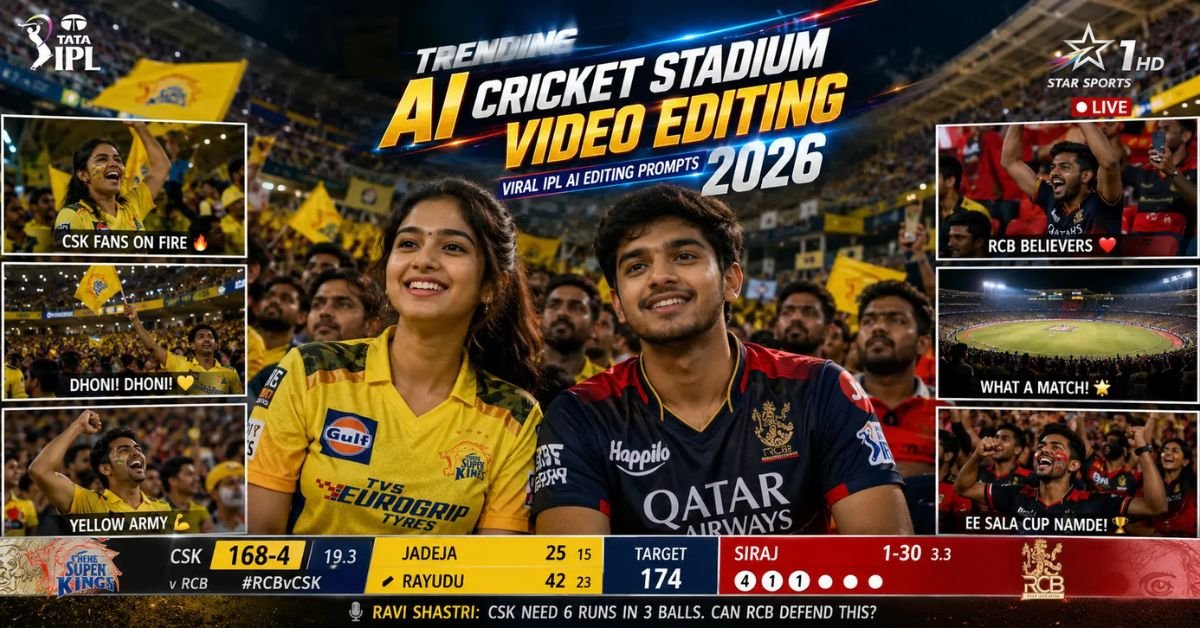
AI video editing is becoming more realistic and viral in 2026, and one of the biggest trends right now is Trending AI Cricket Stadium Video Editing 2026. These AI-generated cricket stadium edits make it look like a person is actually appearing on a live IPL broadcast during a real match.
Creators are using AI tools to create cinematic crowd reactions, realistic TV broadcast visuals, Star Sports-style overlays, stadium lighting, fan reactions, and ultra realistic IPL moments. These edits are getting millions of views on Instagram Reels, YouTube Shorts, TikTok, and Pinterest because cricket fans instantly connect with this type of content.
The best thing is that you no longer need advanced VFX or professional editing software. AI tools can now generate realistic cricket stadium videos using detailed prompts and a reference image.
In this article, you will get the best AI Cricket Stadium Video Editing prompts, prompt settings, editing tips, SEO-friendly use cases, common mistakes, and expert tricks to create highly realistic IPL-style AI edits in 2026.
Why AI Cricket Stadium Editing Is Trending in 2026?
Cricket is one of the most watched sports globally, especially IPL matches. Fans love seeing themselves inside stadium moments, crowd reactions, and broadcast camera shots. AI editing now makes this possible with ultra realistic results.
This trend is growing fast because:
- IPL content gets massive social media engagement
- Broadcast-style edits look realistic and viral
- AI tools now create realistic crowd scenes
- Sports fan edits perform well on reels and shorts
- Viewers emotionally connect with stadium atmosphere
- Cricket audience is huge globally
Best AI Tools for Cricket Stadium Video Editing
- ChatGPT AI Image & Video Generator
- Runway ML
- Pika AI
- Kling AI
- Leonardo AI
- Midjourney
- Gemini AI
Main Trending AI Cricket Stadium Video Editing Prompts
Below are the best copy-paste AI prompts for creating realistic cricket stadium crowd reaction videos and IPL broadcast edits.
Prompt 1
The shot feels exactly like a genuine TV crowd cutaway during a tense moment of the game when the broadcast camera finds a notable guest in the audience. The subject from the reference image is seated in the crowd wearing the same t-shirt, same hairstyle, same facial features, same lighting, and same stadium environment from the original image. Preserve identity strongly and maintain facial consistency throughout the full sequence. This is a real live sports-broadcast style shot – not cinematic film style. The subject is smiling casually and naturally, reacting to the match atmosphere. she is not performing for the camera and is not constantly making eye contact with the lens. Her behavior should feel completely authentic, like a real crowd reaction captured during a live game. One continuous take. No cuts. No camera angle changes. Action Timeline 0 to 2 seconds: The camera lands on her in the crowd naturally.She smiles casually while watching the game. She briefly glances toward the field, then toward the giant stadium screen/Jumbotron, then back toward the match. Background crowd movement feels alive and energetic. 2 to 4 seconds: She notices himself on the big screen and gives a relaxed natural wave toward the camera. Her eyes look at the camera 5 Best South Indian Girl Photo Prompts for ChatGPT & Gemini (2026)
Prompt 2
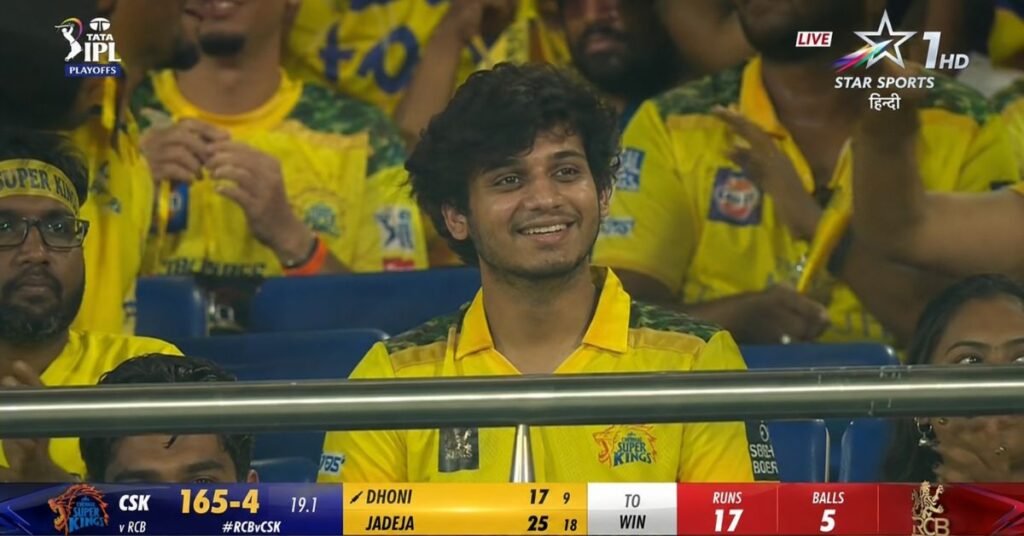
A screenshot from a live IPL cricket TV broadcast on Star Sports. The camera cuts to the audience our reference image person sitting in the crowd, smiling naturally and unaware they’re on camera. The subject and is wearing csk jersey, is seated in premium stadium seats near the boundary rope during a high-energy match between Royal Challengers Bengaluru (RCB) and Chennai Super Kings (CSK). Hardlock: Do not alter their facial structure, skin texture, or likeness in any way.The stadium atmosphere is electric packed crowd, vibrant red and yellow team colors throughout the stands, dramatic stadium floodlights, flags waving, blurred motion from cheering fans in the background. Full authentic cricket broadcast overlay visible: IPL-style scorecard graphics, Star Sports logo watermark, over count, team scores, player stats ticker, match status.The game is IPL playoffs – Qualifier match atmosphere. CSK currently leading the series momentum after dominating previous matches against RCB.The image should look exactly like a real TV broadcast screenshot – realistic sports broadcast cinematography, live camera framing, authentic sports color grading, slight compression artifacts, interlacing grain, subtle motion blur, realistic depth of field from a broadcast zoom lens, candid audience capture aesthetic.16:9 aspect ratio, ultra-realistic live sports broadcast feel, indistinguishable from an actual televised IPL match screenshot.
Prompt 3
Create an ultra realistic AI cricket stadium cinematic video scene using the uploaded reference image while preserving the exact same face, hairstyle, skin tone, expression, and identity. The subject is seated inside a packed international cricket stadium during a high-pressure IPL final match at night. Massive floodlights illuminate the field while thousands of cheering fans wave flags and react emotionally in the background. The camera zooms naturally toward the subject during a tense match moment as giant LED screens display live scores and player statistics. Add realistic sports broadcast overlays including score ticker, commentary graphics, over count, team logos, and live TV watermark. The person reacts naturally by smiling, clapping softly, looking toward the field, and briefly noticing themselves on the giant stadium screen. Keep the entire sequence realistic like an authentic live sports broadcast with subtle camera shake, realistic motion blur, zoom-lens depth of field, compression grain, and cinematic stadium atmosphere. 16:9 aspect ratio, ultra HD 4K quality, highly realistic IPL sports broadcast aesthetic.
What Makes AI Cricket Stadium Videos Go Viral?
Cricket fans emotionally connect with stadium moments. When viewers see realistic crowd reactions and IPL broadcast visuals, they instantly stop scrolling. These edits create excitement and feel very authentic.
The main reason these videos perform well is because they combine:
- Sports emotions
- IPL excitement
- Broadcast realism
- Crowd atmosphere
- Fan reaction moments
- Cinematic sports visuals
Best Settings for AI Cricket Stadium Editing
- Aspect Ratio: 16:9
- Video Quality: 4K or Ultra HD
- Style: Real Sports Broadcast
- Lighting: Stadium Floodlights
- Camera Style: Broadcast Zoom Lens
- Effects: Motion Blur + Compression Grain
- Environment: Packed Stadium Crowd
- Color Tone: Realistic Sports Broadcast
How to Create More Realistic Cricket Stadium AI Videos?
If you want highly realistic AI cricket edits, then your reference image quality matters a lot. AI tools work best when the face is clear and lighting is balanced.
For better results:
- Use clear face photos
- Choose natural expressions
- Add realistic stadium details
- Keep motion natural and smooth
- Use official sports broadcast style prompts
- Add realistic crowd reactions
Best Use Cases of AI Cricket Stadium Editing
- Instagram Reels
- YouTube Shorts
- Cricket Fan Edits
- IPL Reaction Videos
- Sports Meme Content
- Profile Video Editing
- Social Media Viral Content
- Sports Fan Pages
Common Mistakes to Avoid
- Using low-quality reference photos
- Adding unrealistic stadium graphics
- Using too much cinematic blur
- Ignoring realistic sports lighting
- Adding fake expressions
- Making crowd movement unnatural
Expected Output Quality
When you use these prompts correctly, you get:
- Ultra realistic IPL broadcast edits
- Authentic crowd reaction scenes
- Professional sports TV visuals
- Cinematic cricket atmosphere
- Highly engaging social media videos
- Premium sports broadcast quality
How to Optimize Cricket AI Content for Google AI Overview?
If you want your article to rank better in Google AI Overview and search results, then your content should answer user questions clearly and naturally.

To improve ranking:
- Use simple human-friendly language
- Add clear headings and subheadings
- Answer FAQs naturally
- Include practical editing tips
- Use trending keywords naturally
- Keep prompts detailed and useful
Google AI Overview prefers content that is easy to understand, informative, and genuinely helpful for users.
Pro Tips for Viral AI Cricket Stadium Videos
- Use realistic crowd sounds in videos
- Add subtle broadcast grain effects
- Keep facial expressions natural
- Use official IPL-style overlays carefully
- Add realistic camera zoom movement
- Keep stadium lighting dramatic but natural
- Use emotional fan reactions for engagement
Why Cricket Stadium AI Edits Perform So Well?
Cricket is emotional for millions of fans worldwide. When people see realistic IPL-style visuals with authentic crowd moments, they instantly connect with the content emotionally.
These edits become viral because:
- Sports content gets high engagement
- IPL audience is massive globally
- Broadcast visuals feel authentic
- Crowd reactions increase realism
- AI sports edits look futuristic and creative
SEO Friendly FAQs
1. What is Trending AI Cricket Stadium Video Editing 2026?
It is an AI editing trend where users create realistic IPL-style cricket stadium videos and crowd reaction edits using AI prompts and reference images.
2. Which AI tool is best for cricket stadium video editing?
Runway ML, Pika AI, Kling AI, ChatGPT Image Generator, and Leonardo AI are among the best tools for cricket stadium AI editing.
3. Can beginners create AI cricket stadium videos?
Yes, beginners can easily create these edits using copy-paste prompts and high-quality reference images.
4. Which aspect ratio works best for cricket edits?
The 16:9 aspect ratio works best for realistic sports broadcast style videos and YouTube content.
5. How can I make AI cricket edits more realistic?
Use detailed broadcast-style prompts, realistic crowd movement, stadium floodlights, subtle motion blur, and authentic sports overlays.
Final Words
The Trending AI Cricket Stadium Video Editing 2026 trend is becoming one of the most exciting AI sports editing styles because it creates realistic IPL broadcast moments using only prompts and reference images.
Using the prompts shared above, you can create viral cricket crowd reactions, realistic sports broadcast visuals, and highly engaging AI fan edits for Instagram, YouTube Shorts, and social media.
Try different stadium environments, crowd emotions, lighting styles, and match atmospheres to create your own unique cricket AI edits in 2026.