
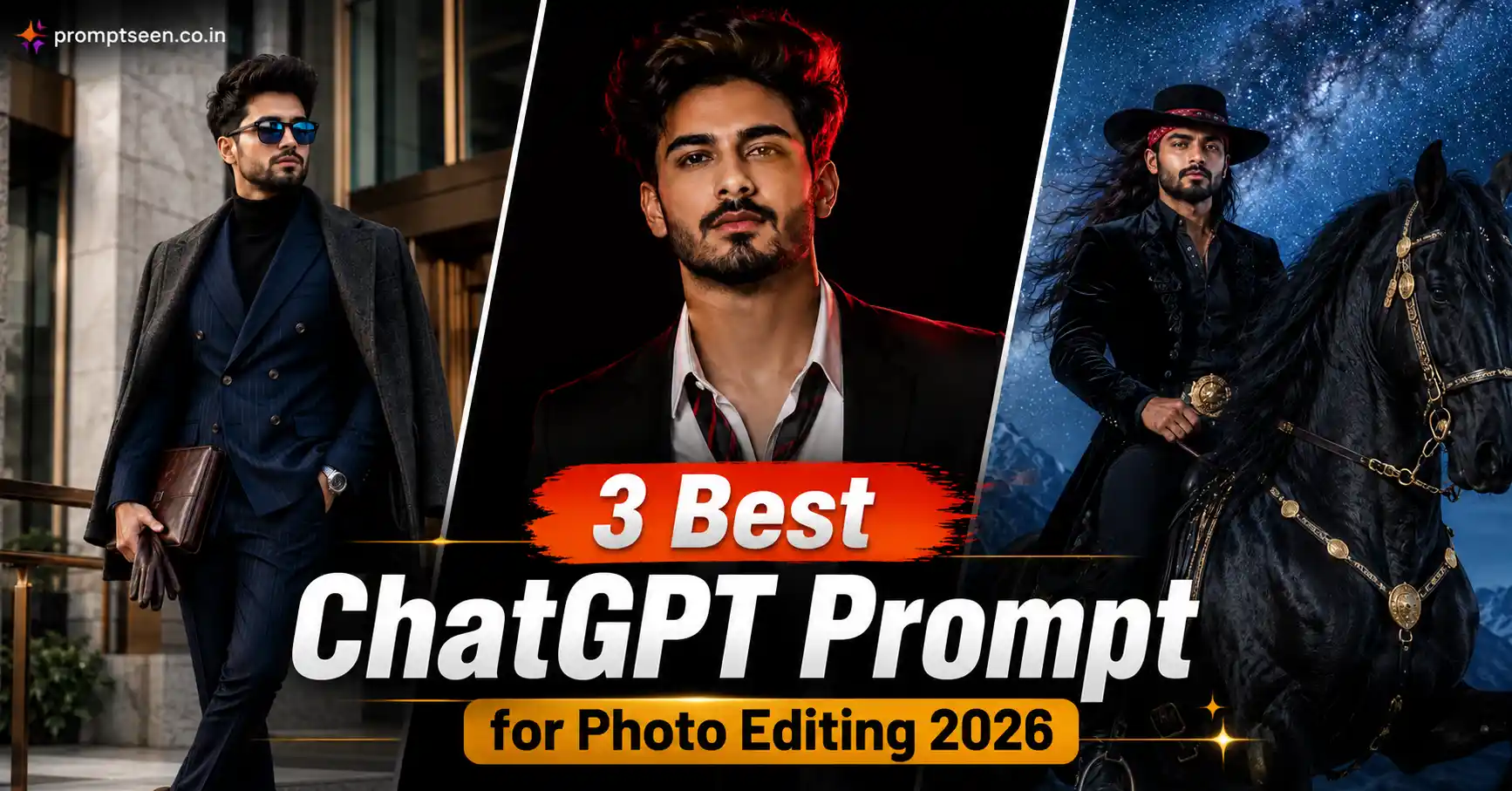
AI photo editing has completely changed the way people create professional-looking portraits. What once required Photoshop, Lightroom, expensive cameras, and years of editing experience can now be achieved with a detailed AI prompt. In 2026, creators, influencers, photographers, and digital artists are using ChatGPT-powered prompts to generate cinematic portraits that look almost identical to high-end DSLR photography.
If you’ve been searching for the ChatGPT Prompt for Photo Editing, you’ve probably noticed that simple prompts no longer deliver the best results. Today’s AI image models respond much better to prompts that describe facial identity, lighting, wardrobe, camera settings, background, composition, and color grading in great detail.
Modern AI image generators are also much better at preserving identity. They can recreate your face with remarkable accuracy while changing almost everything else around you—from clothing and background to lighting and mood. This makes AI ideal for creating editorial portraits, fashion campaigns, lifestyle photography, cinematic posters, and luxury social media images.
Whether you’re editing a personal photo, creating Instagram content, designing portfolio images, or experimenting with AI photography, a detailed prompt can dramatically improve the final result. The prompts shared in this guide are designed to work with ChatGPT Image Generator, Gemini AI, Flux AI, Midjourney, Leonardo AI, and Adobe Firefly.
A ChatGPT Prompt for Photo Editing is a detailed AI instruction that tells the model exactly how to transform your uploaded image while keeping your face unchanged. A good prompt includes identity preservation, lighting, composition, camera settings, wardrobe, environment, and image quality. This helps generate realistic 8K portraits that resemble professional DSLR photography.
Why ChatGPT Photo Editing Prompts Are More Popular Than Ever
AI-generated portraits are no longer limited to artistic illustrations. The latest generation of AI models focuses heavily on realism. They understand natural lighting, skin texture, clothing materials, facial proportions, and camera optics much better than previous versions.
This improvement has made ChatGPT photo editing prompts extremely popular among creators who want magazine-quality images without organizing expensive photoshoots. Instead of spending hours editing, users simply upload one clear reference photo and describe the final scene in detail.
Another reason these prompts are trending is consistency. Once you create a prompt that matches your preferred editing style, you can reuse it across multiple photos while maintaining the same premium look. This is especially useful for influencers, photographers, bloggers, and personal brands that want a consistent visual identity.
Detailed prompts also help AI avoid common problems like distorted hands, unrealistic skin, incorrect facial proportions, or inconsistent lighting. By providing clear instructions, you give the AI enough information to create a much more believable result.
Today’s best AI portrait prompts usually include:
- Strict facial identity preservation
- Professional DSLR camera settings
- Natural lighting direction
- Luxury editorial styling
- Photorealistic skin texture
- HDR image quality
- Premium cinematic color grading
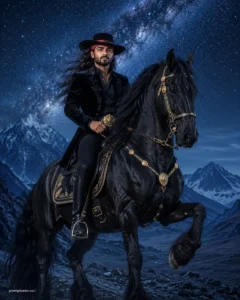
Prompt 1: Cinematic Horse Rider Editorial Portrait
This prompt creates a dramatic luxury equestrian portrait while keeping every facial detail identical to your uploaded image. The final result looks like a premium fashion editorial captured during a cinematic night shoot.
Use the uploaded image as the exact identity reference and preserve 100% facial structure, facial proportions, skin tone, eye shape, hairstyle, expression, and natural skin texture without changing any recognizable detail. Create an ultra-realistic 8K vertical composite portrait featuring the subject confidently riding a majestic black Friesian horse across a blue-toned mountain landscape beneath a breathtaking midnight sky filled with countless stars and a softly visible Milky Way. Dress the subject in a luxurious black velvet equestrian blazer, fitted black riding trousers, tall premium leather riding boots, a classic black Cordobés-style wide-brim hat secured with a vibrant red bandana, while allowing long natural dark hair to flow realistically beneath the hat with individual strands visible. Add an ornate gold belt buckle, premium gold horse tack including decorated bridle, breastplate, reins, and saddle details. Capture the horse mid-trot with one front leg raised naturally. Illuminate the scene using a cool white off-camera strobe positioned from the front-left while maintaining a naturally dark mountain environment. Apply cinematic cool-blue color grading, realistic shadows, rich black tones, subtle gold highlights, Canon EOS R5 DSLR realism, hyper-realistic composite photography, HDR rendering, masterpiece quality, ultra-detailed 8K resolution, vertical 4:5 composition. Add a small elegant watermark reading “promptseen.co.i” in the bottom-left corner.
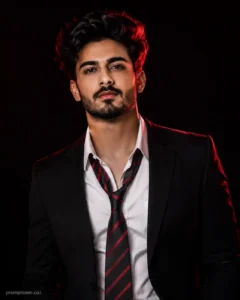
Prompt 2: Luxury Black Background Fashion Portrait
If you prefer a clean studio portrait with dramatic lighting and a premium magazine feel, this prompt creates a sophisticated fashion image that looks ready for a luxury editorial cover.
Use the uploaded image as the exact identity reference and preserve 100% facial structure, hairstyle, skin tone, facial proportions, beard, expression, and every natural facial detail without altering any recognizable feature. Create an ultra-realistic luxury editorial portrait against a seamless deep black studio background. Dress the subject in a premium black tailored blazer layered over an open-collar white dress shirt finished with a relaxed black-and-red striped necktie. The subject stands confidently with a calm expression while looking directly toward the camera. Illuminate the portrait using dramatic cinematic lighting with a soft frontal beauty light complemented by a rich red rim light wrapping naturally around the shoulders and hair. Preserve realistic skin pores, natural beard texture, subtle facial highlights, and deep cinematic shadows. Capture the image using Canon EOS R5 DSLR photography, RF 85mm f/1.2 lens, shallow depth of field, HDR lighting, luxury fashion editorial color grading, masterpiece quality, ultra-detailed 8K resolution, premium movie-poster aesthetics, vertical 4:5 composition. Add a small elegant watermark reading “promptseen.co.i” in the bottom-left corner.
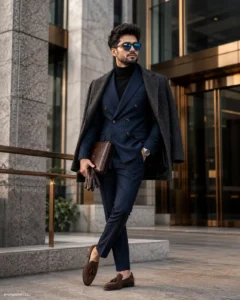
Prompt 3: Luxury Architectural Fashion Portrait
This prompt creates a premium high-fashion editorial portrait in front of modern architecture. It focuses on elegant styling, realistic textures, natural daylight, and luxury magazine aesthetics while keeping the uploaded face completely unchanged.
Use the uploaded image as the exact identity reference and preserve 100% facial structure, skin tone, hairstyle, beard, facial proportions, eye shape, natural expression, and every recognizable facial detail without changing any aspect of the identity. Create an ultra-realistic full-body luxury fashion portrait captured from a slightly low-angle perspective in front of a premium contemporary architectural building featuring clean geometric lines, textured natural stone walls, bronze metal accents, and floor-to-ceiling glass panels. The subject stands confidently beside an elegant bronze handrail with one leg naturally crossed over the other. Dress the subject in a luxury navy double-breasted pinstripe suit layered over a fitted black turtleneck, with a premium charcoal overcoat resting naturally across the shoulders. Add stylish reflective blue-lens sunglasses, a luxury silver wristwatch, dark leather gloves tucked casually into one hand, and polished brown suede tassel loafers. The subject carries a premium brown leather document holder while the opposite hand rests comfortably inside the trouser pocket. Soft diffused morning daylight creates realistic highlights across the face, fabric textures, polished leather, brushed metal surfaces, and architectural details. Capture using Canon EOS R5 DSLR photography, RF 50mm f/1.2L lens, HDR lighting, shallow depth of field, premium Lightroom color grading, cinematic editorial fashion styling, realistic skin pores, natural hair texture, masterpiece quality, hyper-realistic rendering, ultra-detailed 8K resolution, vertical 4:5 composition. Add a small elegant watermark reading “promptseen.co.i” in the bottom-left corner. Motu Patlu Image & Video Prompt 2026
Tips to Get Better AI Photo Editing Results
A detailed prompt is only one part of the process. The reference image you upload has an equally important role in the final result. Use a high-resolution image with balanced lighting and a clear view of your face. Modern AI models preserve identity much more accurately when facial details are sharp and unobstructed.
Try to describe every important element instead of relying on short instructions. Mention the camera angle, background, lighting direction, wardrobe, mood, composition, focal length, and color grading. These details help ChatGPT understand the exact style you’re aiming for and usually produce much more realistic outputs.
Professional camera settings also improve realism. Mentioning cameras like the Canon EOS R5, Sony A1, or Nikon Z9 together with portrait lenses such as the RF 50mm f/1.2L or RF 85mm f/1.2L helps recreate authentic depth of field, smooth background separation, and premium optical rendering.
Lighting is another major factor. Soft window light, cinematic golden-hour sunlight, luxury studio lighting, or balanced overcast daylight generally produce natural skin tones and realistic shadows. Avoid asking for too many dramatic effects unless they match the scene.
Finally, keep your prompts consistent. If you’re building a personal brand or Instagram portfolio, reuse the same editing style while changing only the location, wardrobe, or pose. A consistent visual identity makes your profile look far more professional than using completely different editing styles for every image.
Best AI Tools for ChatGPT Photo Editing
- ChatGPT Image Generator
- Gemini AI
- Flux AI
- Midjourney
- Leonardo AI
- Adobe Firefly
How to Get Better Results with ChatGPT Photo Editing Prompts
The final quality of an AI-edited image depends on two things: your reference photo and the prompt itself. Even the most advanced AI model cannot produce a premium editorial portrait if the uploaded image is blurry, heavily filtered, or captured in poor lighting. Always start with a high-resolution photo where your face is clearly visible and your natural expression can be seen easily.
One of the biggest mistakes beginners make is writing very short prompts. Instead of simply asking AI to “make a stylish photo,” describe every important detail. Mention the background, clothing, pose, lighting direction, camera settings, color grading, mood, and composition. The more precise your instructions are, the more realistic the final image will look.
Identity preservation is equally important. Always include instructions that tell the AI to preserve your facial structure, hairstyle, skin tone, facial proportions, beard, eyebrows, and natural expression. This prevents unwanted changes while allowing the AI to redesign everything around you.
Professional lighting can completely change the mood of a portrait. Warm golden-hour sunlight creates soft skin tones, while cinematic studio lighting adds depth and luxury. Soft window light, overcast daylight, or carefully positioned rim lighting usually produces cleaner and more natural-looking results than overly dramatic effects.
Adding professional camera settings also helps improve realism. Mention cameras like the Canon EOS R5, Sony A1, or Nikon Z9 together with portrait lenses such as the RF 50mm f/1.2L or RF 85mm f/1.2L. AI understands these photography terms and often recreates realistic depth of field, natural lens compression, and premium background blur.
Finally, keep your editing style consistent. If you’re creating images for Instagram, YouTube thumbnails, LinkedIn, or a personal brand, using the same color grading, lighting style, and composition across multiple images creates a much stronger visual identity.
Best AI Tools for ChatGPT Photo Editing
- ChatGPT Image Generator
- Gemini AI
- Flux AI
- Midjourney
- Leonardo AI
- Adobe Firefly
Frequently Asked Questions
Can ChatGPT create professional photo edits?
Yes. The latest ChatGPT image generation models can produce highly realistic edits with natural lighting, premium fashion styling, realistic skin texture, and accurate facial identity preservation when provided with a detailed prompt.
What makes a ChatGPT photo editing prompt more effective?
A good prompt includes identity preservation, clothing, background, lighting, camera settings, composition, pose, mood, and color grading. The more detailed your instructions are, the better the AI understands your creative vision.
Do these prompts work with Gemini AI and other generators?
Yes. Although this guide focuses on ChatGPT, these prompts also work well with Gemini AI, Flux AI, Midjourney, Leonardo AI, and Adobe Firefly. You may only need to make small wording adjustments depending on the platform you use.
How can I make AI-generated portraits look like DSLR photos?
Use a high-quality reference image, preserve your natural identity, include professional camera settings, describe realistic lighting, add Lightroom-style color grading, and keep the composition clean. These details help AI create images that closely resemble professional DSLR photography.
Why are detailed AI prompts trending in 2026?
Modern AI models respond much better to detailed instructions than simple commands. Detailed prompts give you greater control over lighting, styling, facial accuracy, background, and overall image quality, resulting in more realistic and consistent edits.
Final Thoughts
The ChatGPT Prompt for Photo Editing has become one of the most powerful tools for creating realistic AI portraits in 2026. With a clear reference image and a well-written prompt, you can generate luxury fashion portraits, cinematic editorial photographs, professional lifestyle images, and premium social media content without advanced editing skills. The prompts shared in this guide are designed to preserve your natural identity while adding realistic lighting, DSLR-quality depth, elegant styling, and professional color grading. Feel free to customize the wardrobe, location, or mood to match your personal style, but always keep the identity-preservation instructions for the most authentic results.