
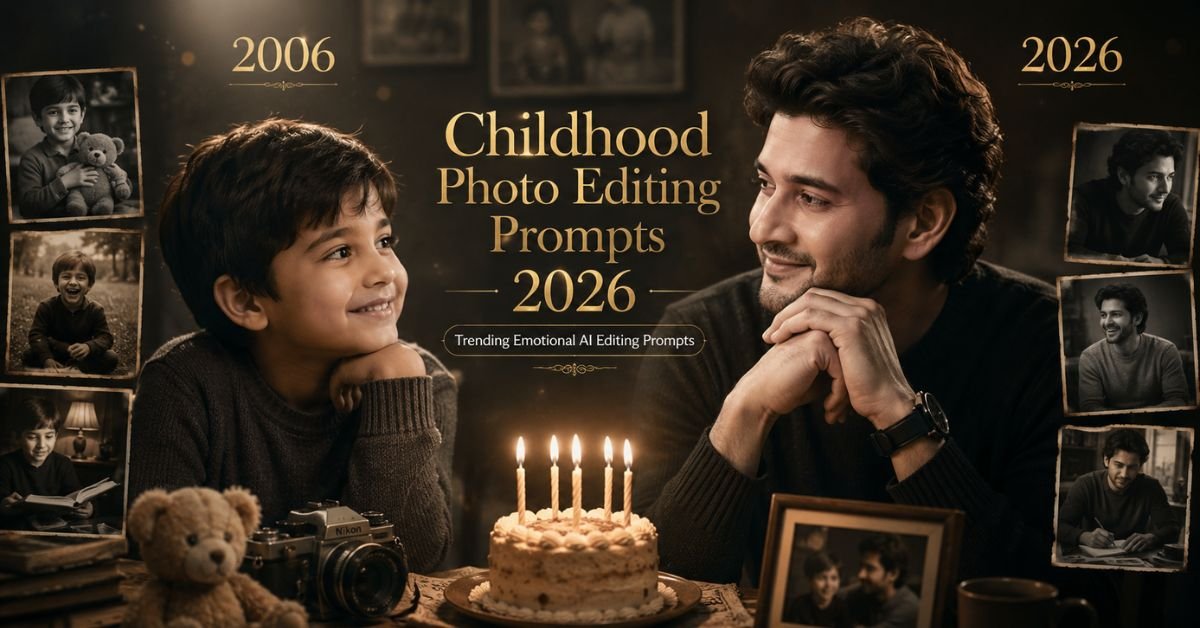
Emotional AI photo editing is becoming one of the biggest trends in 2026, and the Childhood Photo Editing Prompts 2026 trend is going viral across Instagram, TikTok, Pinterest, and YouTube Shorts. These edits beautifully combine childhood memories with present-day portraits in one emotional cinematic frame.
People love these AI-generated edits because they create a deep emotional connection. Seeing your childhood version looking at your present self feels nostalgic, heart-touching, and visually powerful at the same time.
AI tools can now create ultra realistic childhood comparison edits with soft studio lighting, emotional expressions, black-and-white photography style, cinematic depth, and professional photoshoot aesthetics. These edits are becoming very popular for birthdays, memory posts, reels, and profile content.
In this article, you will get the best Childhood Photo Editing AI prompts, settings, editing tips, SEO-friendly guidance, and emotional AI photo ideas that are easy to use even for beginners.
Why Childhood AI Photo Editing Is Trending in 2026?
People emotionally connect with memories and nostalgia. Childhood comparison edits remind users of their journey, growth, and life changes, which makes the content highly engaging on social media.
These edits are trending because:
- Emotional content performs well online
- People love nostalgic memories
- AI makes realistic comparison edits easy
- Black-and-white cinematic style looks premium
- Perfect for birthdays and memory posts
- Emotional storytelling increases engagement
Best AI Tools for Childhood Photo Editing
- ChatGPT Image Generator
- Midjourney AI
- Leonardo AI
- Gemini AI
- Flux AI
- Adobe Firefly
- Bing Image Creator
Main Childhood Photo Editing Prompts 2026
Below are the best copy-paste AI prompts for creating emotional childhood comparison edits.
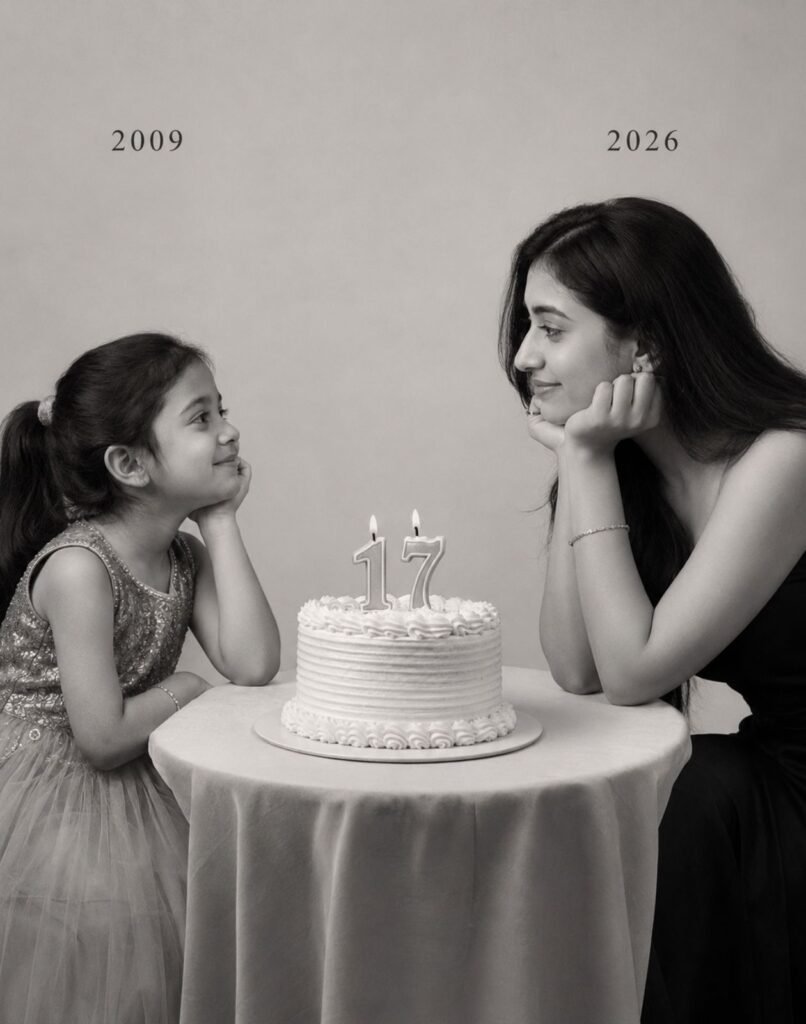
Prompt 1
Using the images I’m going to upload to create a soft, emotional, black and white art. Let the formation be as follows: On the left: a child version of me (from a childhood photo) looking with an innocent smile to the right, with “2009” written above it. On the right: a present version of me (from a recent photo) sits with her hands under her chin and looks at the child with a calm smile, with “2026” written above her. In the middle: a table with a simple, elegant birthday cake with number 17 on top. Studio background: plain and soft (studio background). The lighting: soft, cinematic, warm (even a black-and-white photo). Style: professional, minimal, emotional photography, focusing on feelings and visual communication between the two versions. Make the picture look so real like a real photoshoot. Keep my original features without changing. Photo size: 4:5. 3 Best Blossom Beauty Portrait Prompt For Girls 2026
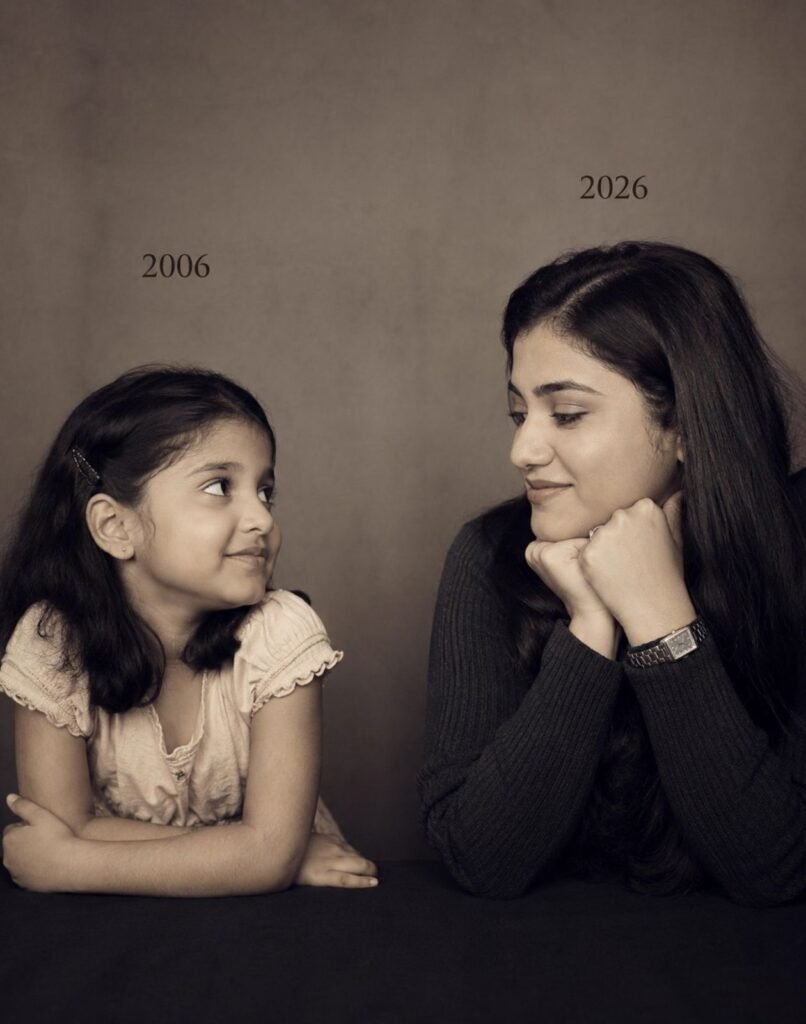
Prompt 2
Let the formation be as follows: On the left: a child version of me (from a childhood photo) looking with an innocent smile to the riaht, with 2006 written above it. On the right: A present version of me (from a recent photo sits with her hands under her chin and looks at the child with a calm smile wwith2026″ written above her. Studio background: plain and soft (studic background) The lighting: Soft, cinematic. warm (even a black-and-white photo) Style: Professional, minima emotional photography, focusing on feelings and visual communication between the two versions. Make the picture look so real like abetween the two versions. Make the picture look so real like a rea photoshoot. Keep mv oriqinal features without changing.photo size 4:5
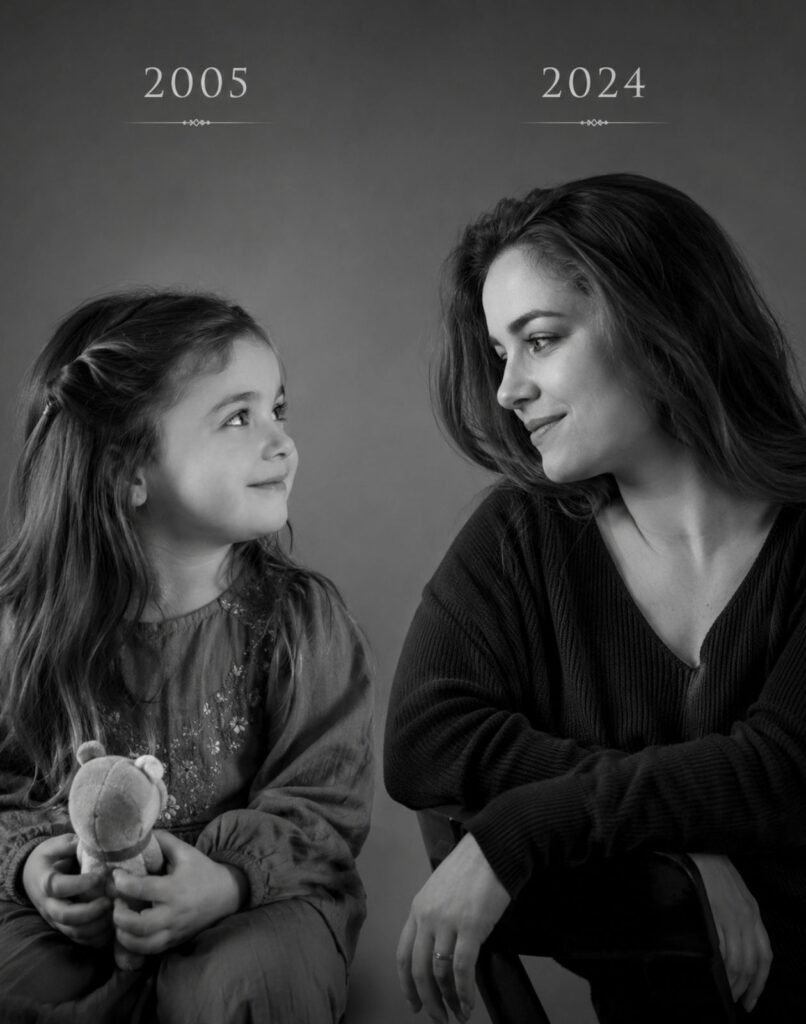
Prompt 3
Create an ultra realistic emotional childhood comparison portrait using the uploaded childhood and present-day images while preserving the exact same facial features and expressions naturally. On the left side place the childhood version smiling innocently while holding a small toy and looking softly toward the future version. On the right side place the present version sitting calmly with emotional eyes and gentle smile while looking toward the child version. Add soft cinematic studio lighting, subtle shadows, elegant black-and-white photography style, smooth depth of field, realistic skin texture, minimal studio background, emotional storytelling atmosphere, and luxury professional photoshoot composition. Add elegant year text above both versions with warm cinematic contrast and realistic emotional mood. Ultra realistic DSLR portrait photography, high detail rendering, premium emotional aesthetic, 4:5 aspect ratio.
What Makes Childhood Comparison Edits So Emotional?
Childhood comparison edits tell a story without using many words. The emotional connection between the younger and present version creates a nostalgic atmosphere that instantly connects with viewers.
These edits focus on:
- Memories and emotions
- Life journey storytelling
- Family and birthday moments
- Realistic emotional expressions
- Minimal cinematic photography
- Soft black-and-white aesthetic
Best Settings for Childhood AI Photo Editing
- Aspect Ratio: 4:5
- Style: Emotional Cinematic Portrait
- Lighting: Soft Studio Lighting
- Color Tone: Black and White or Warm Minimal
- Quality: Ultra HD or 8K
- Depth of Field: Soft Blur
- Rendering: Photorealistic
- Camera Style: DSLR Portrait Photography
How to Create Better Childhood Comparison Photos?
If you want highly emotional and realistic AI edits, then your uploaded photos should be clear and emotionally expressive. Childhood photos with natural smiles usually create better emotional connection.
For better results:
- Use clear childhood photos
- Upload recent portrait with soft expression
- Keep background simple
- Use cinematic lighting descriptions
- Maintain realistic facial similarity
- Focus on emotions instead of effects
How to Optimize This Content for Google AI Overview?
If you want your article to appear in Google AI Overview, your content should answer user questions naturally and clearly. Google prefers helpful content written in simple language.
To improve ranking chances:

- Use natural conversational writing
- Add useful headings and FAQs
- Answer beginner questions clearly
- Keep prompts practical and detailed
- Avoid unnecessary technical language
- Focus on real user intent
Google AI Overview usually prefers content that feels useful, trustworthy, and easy to understand for everyone.
Best Use Cases of Childhood AI Editing
- Birthday Posts
- Instagram Reels
- Memory Collage Photos
- WhatsApp Status
- Family Emotional Posts
- YouTube Shorts Content
- Nostalgic Social Media Posts
- Personal Growth Storytelling
Common Mistakes to Avoid
- Using blurry childhood photos
- Adding too many effects
- Using unrealistic facial changes
- Over-editing skin texture
- Ignoring emotional expressions
- Using distracting backgrounds
Expected Output Quality
When you use these prompts properly, you get:
- Ultra realistic emotional portraits
- Professional cinematic photoshoot style
- Emotional storytelling visuals
- Beautiful childhood comparison edits
- Social media ready content
- Premium black-and-white photography aesthetic
Pro Tips for Viral Childhood AI Photos
- Use natural childhood smiles
- Keep the pose emotional and calm
- Use minimal studio backgrounds
- Add soft cinematic shadows
- Use black-and-white editing carefully
- Keep the eye connection realistic
- Add subtle year text for storytelling
Why Childhood AI Edits Go Viral?
People emotionally connect with nostalgic content very quickly. Childhood comparison edits feel personal, emotional, and relatable, which increases sharing and engagement on social media platforms.
These edits perform well because:
- Emotions increase engagement
- Nostalgic memories feel relatable
- Black-and-white visuals look cinematic
- Storytelling keeps viewers interested
- Realistic AI editing feels impressive
SEO Friendly FAQs
1. What are Childhood Photo Editing Prompts 2026?
These are AI prompts used to create emotional comparison photos between childhood and present-day versions using cinematic editing style.
2. Which AI tool is best for childhood photo editing?
ChatGPT Image Generator, Midjourney, Leonardo AI, and Gemini AI are among the best tools for emotional childhood AI edits.
3. Can beginners create childhood comparison edits?
Yes, beginners can easily create these emotional edits using copy-paste prompts and clear childhood photos.
4. Which aspect ratio works best?
The 4:5 aspect ratio works best for Instagram posts and emotional portrait compositions.

5. How can I make childhood AI photos more realistic?
Use high-quality childhood photos, realistic expressions, soft studio lighting, and emotional cinematic prompts.
Final Words
The Childhood Photo Editing Prompts 2026 trend is becoming one of the most emotional AI editing styles because it beautifully combines memories, nostalgia, and cinematic storytelling into one realistic image.
Using the prompts shared above, you can create heart-touching comparison portraits, birthday memory edits, emotional social media posts, and cinematic AI artworks in just a few clicks.
Try different poses, lighting styles, black-and-white aesthetics, and emotional expressions to create your own unique childhood AI edit in 2026.