
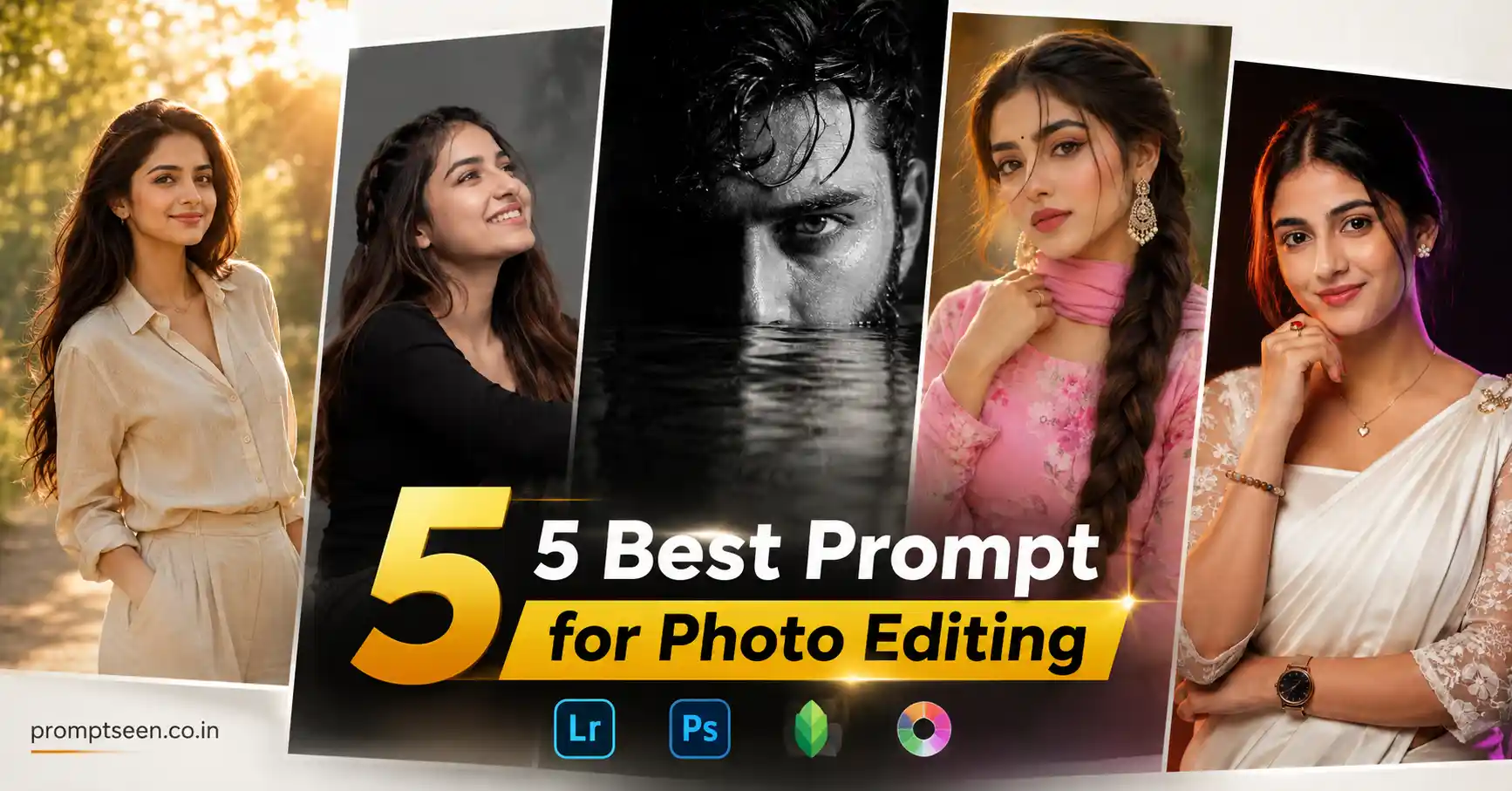
AI photo editing has changed dramatically in 2026. What once required advanced Photoshop skills and expensive software can now be achieved within seconds using a well-written prompt. From luxury fashion portraits to cinematic studio photography, AI image generators are capable of producing incredibly realistic results while preserving facial identity with remarkable accuracy.
Whether you’re creating content for Instagram, Facebook, Pinterest, YouTube thumbnails, professional portfolios, or personal branding, using the Best Prompt for Photo Editing can instantly improve the quality of your images. The difference between an average AI-generated photo and a premium editorial portrait often comes down to the prompt itself.
Modern AI tools no longer simply generate attractive images. They now understand realistic lighting, DSLR camera settings, skin textures, clothing materials, cinematic color grading, facial identity preservation, and professional composition. As a result, creators can produce images that closely resemble photographs captured in high-end studios.
If you’re searching for the Best Prompt for Photo Editing, this article includes five highly detailed prompts that work perfectly with Gemini AI, ChatGPT Image Generator, Midjourney, Leonardo AI, Flux AI, and Adobe Firefly.
Why AI Photo Editing Prompts Are Trending in 2026
The biggest reason AI photo editing has become so popular is realism. Earlier AI-generated images often looked artificial because facial features changed, lighting felt unrealistic, and textures appeared overly smooth. Today’s AI models are much better at preserving identity while generating professional-quality photography.
Another reason these prompts are trending is their versatility. The same reference image can be transformed into a luxury studio portrait, cinematic fashion campaign, dramatic monochrome artwork, outdoor editorial shoot, or premium social media profile picture simply by changing the prompt.
Professional photographers also use AI during their creative workflow. Instead of replacing photography, AI helps visualize concepts, test lighting styles, create mood boards, and generate artistic variations before actual photoshoots. This has made detailed prompts increasingly valuable.
High-quality prompts now include realistic camera settings, lighting directions, wardrobe descriptions, environmental details, HDR rendering, shallow depth of field, and identity-lock instructions. These details help AI produce results that closely resemble commercial DSLR photography.
Creators love these editing styles because they combine:
- Professional DSLR realism
- Luxury editorial photography
- Accurate identity preservation
- Cinematic lighting
- Premium fashion styling
- Natural skin textures
- Instagram and Pinterest-ready quality
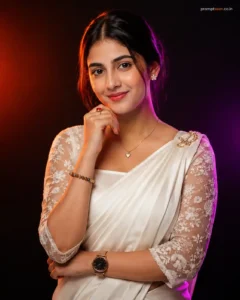
Prompt 1: Luxury Neon Studio Fashion Portrait
This prompt creates a premium studio portrait featuring cinematic dual-color neon lighting inspired by luxury fashion campaigns while preserving every facial detail naturally.
Use the uploaded image as the exact identity reference and preserve 100% facial structure, skin tone, hairstyle, facial features, body proportions, expression, and natural appearance without altering any recognizable detail. Create an ultra-realistic DSLR studio portrait against a premium dark studio background featuring dramatic cinematic low-key lighting. Illuminate one side of the face using a vibrant warm orange neon light while adding a subtle purple-magenta rim light along the opposite side to recreate a professional dual-color fashion lighting setup. Dress the subject in an elegant white modern Kandyan saree with a smooth satin pleated drape secured on the left shoulder using a detailed traditional gold brooch. Pair it with a white floral lace blouse featuring sheer three-quarter sleeves, delicate embroidery, and a square neckline. Style the hair in a clean center-parted look tied neatly back with natural texture. Add small silver flower stud earrings, a thin gold necklace with a heart-shaped pendant, a multicolored beaded bracelet, a decorative gold ring with a red gemstone, a luxury rose-gold mesh watch with a black dial, and elegant red nail polish. Pose the subject facing the camera with the body slightly angled, right hand gently resting beneath the chin, left arm folded naturally across the waist supporting the opposite elbow, maintaining direct eye contact and a soft confident smile. Canon EOS R5 DSLR photography, 85mm portrait lens, f/1.8 aperture, ultra-sharp eye focus, realistic skin pores, HDR lighting, premium editorial color grading, Vogue fashion style, masterpiece quality, ultra-detailed 8K resolution, vertical 4:5 composition. Add minimal logo text “promptseen.co.in”.
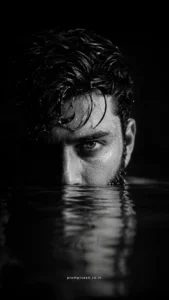
Prompt 2: Dark Water Cinematic Portrait
This prompt creates a dramatic monochrome editorial portrait with intense lighting and a luxury magazine look.
Use the uploaded image as the exact identity reference and preserve 100% facial structure, hairstyle, beard if present, skin tone, facial features, body proportions, expression, and natural appearance without changing any recognizable detail. Create an ultra-realistic cinematic portrait of the subject emerging slowly from dark water with only half of the face visible above the surface. Maintain intense eye contact with the camera while realistic water droplets cover the skin, beard, and hair. Use dramatic low-key lighting with deep shadows against a completely black background, producing a premium monochrome black-and-white editorial atmosphere. Enhance realistic skin texture, sharp beard details, natural water reflections, subtle ripples, shallow depth of field, Canon EOS R5 DSLR photography, 85mm portrait lens, f/1.8 aperture, HDR contrast, photorealistic rendering, luxury fashion magazine styling, masterpiece quality, ultra-detailed 8K resolution, vertical 9:16 composition. Add minimal logo text “promptseen.co.in”.
Prompt 3: Elegant Pink Salwar Portrait
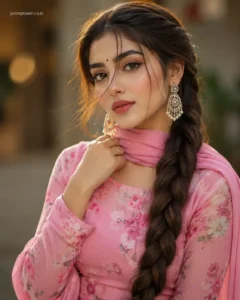
This prompt creates a graceful close-up fashion portrait with soft beauty lighting, realistic facial details, and a timeless ethnic look that works beautifully for social media and portfolio photography.
Use the uploaded image as the exact identity reference and preserve 100% facial structure, eye shape, eyebrows, nose, lips, jawline, skin tone, hairstyle, facial proportions, expression, and natural appearance without altering any recognizable detail. Create a close-up ultra-realistic HD portrait of a beautiful young woman wearing a fitted pink floral chiffon full-sleeve salwar suit with a matching dupatta gracefully wrapped around the neck. Style her with large elegant dangling earrings, long slightly brown hair extending below the knees in a beautifully woven braid, with a few soft strands naturally falling across the face. Add a tiny black bindi, expressive brown eyes, dramatic winged eyeliner, naturally defined wide eyebrows, soft blushing makeup, matte pink lipstick, and a single elegant gold ring. Do not add any necklace. Use soft cinematic beauty lighting, realistic skin texture, shallow depth of field, Canon EOS R5 DSLR photography, 85mm portrait lens, HDR lighting, luxury fashion editorial color grading, photorealistic rendering, masterpiece quality, ultra-detailed 8K resolution, vertical 4:5 composition. Add minimal logo text “promptseen.co.in”.
Prompt 4: Modern Editorial Studio Portrait
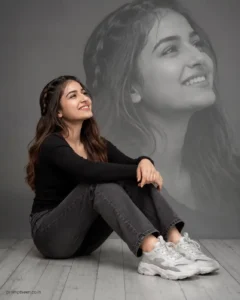
This prompt creates a premium fashion magazine-style portrait with a stylish monochrome background and a clean editorial composition.
Use the uploaded reference image as the exact identity reference and preserve 100% facial structure, hairstyle, skin tone, facial proportions, expression, and natural appearance without changing any recognizable detail. Create a cinematic full-body studio portrait captured from a soft side angle inside a premium photography studio. The subject sits naturally on a light-grey wooden floor with visible plank textures against a seamless grey backdrop. She sits comfortably with her knees slightly raised while both arms rest naturally around them, looking slightly upward with a joyful, candid smile. Dress her in a fitted black full-sleeve top, charcoal-grey straight-fit jeans, and premium white-and-grey chunky sneakers. Style the hair with soft waves and a subtle side braid. Behind her, create a large translucent monochrome close-up portrait of the same face softly blended into the background, producing a luxury double-exposure editorial effect. Use soft even studio lighting, premium fashion color grading, Canon EOS R5 DSLR photography, 85mm lens, shallow depth of field, realistic skin texture, Vogue-inspired editorial styling, HDR rendering, masterpiece quality, ultra-detailed 8K resolution, vertical 4:5 composition. Add minimal logo text “promptseen.co.in”.
Prompt 5: Luxury Golden Hour Outdoor Portrait
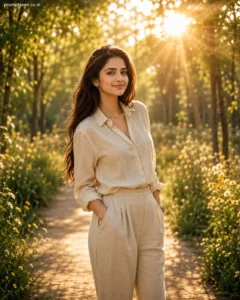
If you prefer natural outdoor photography instead of studio portraits, this prompt creates a premium cinematic image with beautiful golden-hour lighting and DSLR-quality realism.
Use the uploaded image as the exact identity reference and preserve 100% facial structure, hairstyle, skin tone, facial features, body proportions, clothing fit, expression, and natural appearance without altering any recognizable detail. Create an ultra-realistic cinematic outdoor portrait during golden hour inside a peaceful tree-lined pathway surrounded by lush greenery and soft wildflowers. Dress the subject in a premium beige linen outfit with elegant minimal accessories while maintaining a natural relaxed pose and confident expression. Warm golden sunlight filters through the trees, creating beautiful volumetric light rays, realistic lens flare, soft background bokeh, natural shadows, and premium cinematic depth. Enhance realistic skin pores, authentic fabric textures, balanced HDR lighting, Lightroom-style color grading, Canon EOS R5 DSLR photography, RF 85mm f/1.2 lens, shallow depth of field, photorealistic rendering, luxury lifestyle editorial styling, masterpiece quality, ultra-detailed 8K resolution, vertical 4:5 composition. Add minimal logo text “promptseen.co.in”.
How to Get Better Results with AI Photo Editing Prompts
The quality of your AI-generated photo depends largely on the reference image you upload. Choose a clear, high-resolution image where your face is visible, lighting is balanced, and your natural expression can be seen easily. Modern AI models preserve facial identity much more accurately when the original photo contains sharp details and realistic lighting.
One of the biggest mistakes people make is writing short prompts. The more information you provide about clothing, lighting, camera settings, composition, facial identity, background, and mood, the better the final result becomes. Professional-looking AI images are usually created using highly descriptive prompts rather than simple one-line instructions.
Lighting also plays a huge role in realism. Whether you’re creating a luxury studio portrait, a cinematic outdoor photo, or a dramatic monochrome edit, soft directional lighting combined with realistic shadows produces much better results than harsh artificial effects. Warm golden-hour sunlight, dual-color neon lighting, or premium studio softboxes all create completely different visual moods.
Camera settings can further improve image quality. Including professional equipment such as the Canon EOS R5, Sony A7R V, or Nikon Z9 together with portrait lenses like an 85mm f/1.4 or 50mm f/1.2 helps AI recreate authentic DSLR depth of field, lens compression, smooth background blur, and realistic sharpness.
Don’t forget about color grading. Premium Lightroom-style editing with balanced contrast, realistic skin tones, controlled highlights, and natural shadows makes AI-generated images look much closer to commercial photography. Avoid oversaturated colors or excessive filters that reduce realism.
Finally, keep your prompts focused. Instead of mixing multiple styles in a single prompt, choose one clear concept—such as cinematic fashion, luxury studio photography, outdoor golden hour, or monochrome editorial. AI performs much better when the artistic direction is consistent from beginning to end.
Best AI Tools for Professional Photo Editing
- Gemini AI
- ChatGPT Image Generator
- Midjourney
- Leonardo AI
- Flux AI
- Adobe Firefly
Frequently Asked Questions
Which AI tool is best for realistic photo editing in 2026?
Gemini AI, ChatGPT Image Generator, Midjourney, Leonardo AI, Flux AI, and Adobe Firefly are among the most popular AI image generators for creating realistic portraits, fashion photography, cinematic edits, and professional-quality images.
Can AI preserve my face exactly while editing photos?
Yes. Modern AI models can preserve facial structure, hairstyle, skin tone, facial proportions, expressions, and natural identity with excellent accuracy when detailed identity-lock instructions are included in the prompt.
Why are detailed AI prompts important?
Detailed prompts give AI clear instructions about lighting, composition, camera settings, clothing, colors, background, and mood. The more descriptive your prompt is, the more realistic and professional the final image usually becomes.
How can I make my AI-edited photos look like DSLR photography?
Use a high-quality reference photo, include professional camera settings, describe realistic lighting, preserve natural skin texture, add Lightroom-style color grading, and avoid excessive beauty filters. These details help AI create images that closely resemble photographs captured by professional cameras.
Final Thoughts
The Best Prompt for Photo Editing is not simply about adding more words—it is about giving AI clear creative direction. A well-written prompt can transform an ordinary image into a luxury fashion portrait, cinematic editorial photograph, premium outdoor lifestyle photo, or dramatic monochrome masterpiece while preserving your natural identity. With the latest AI image generators available in 2026, realistic lighting, DSLR-quality detail, accurate facial preservation, and professional color grading are now easier to achieve than ever. Try the prompts shared in this guide, customize them to match your own style, and create stunning AI-edited photos that look ready for magazines, social media, personal branding, or professional portfolios.