
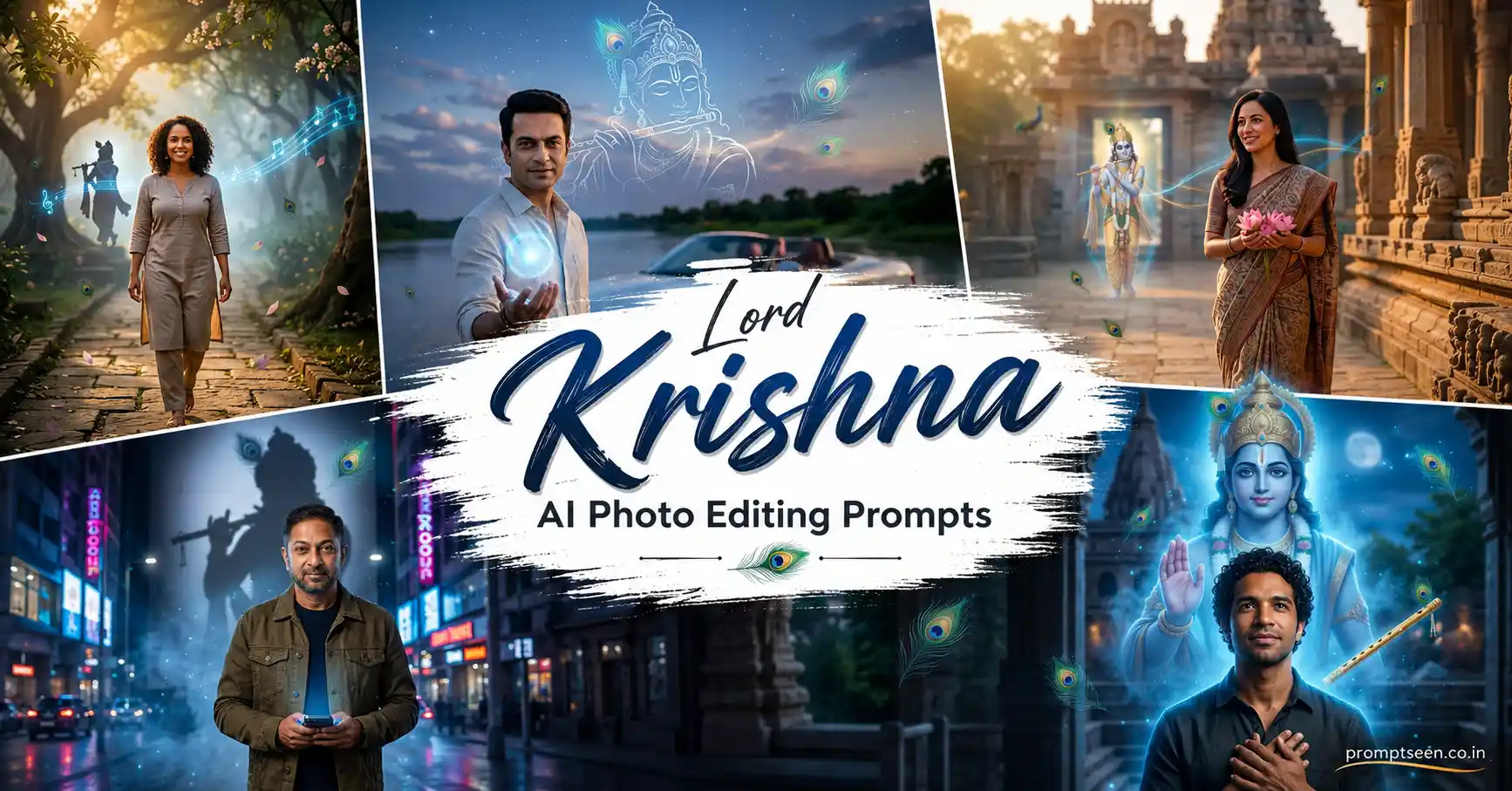
Devotional AI edits have changed a lot over the past year. Instead of replacing the person with a digital painting, the latest trend keeps the face completely natural while adding subtle spiritual elements inspired by Lord Krishna.
I generated these prompts several times before publishing them. The versions that looked the most believable weren’t the ones with the brightest blue effects—they were the ones where the divine elements blended naturally into the lighting and background.
Every prompt below is designed for a vertical 9:16 composition, making it suitable for Instagram Reels, WhatsApp Status, wallpapers, and devotional social media posts.
Less Glow Often Creates a Stronger Spiritual Feel
During my first few generations, I added too much blue light everywhere. The result looked more like a fantasy poster than a peaceful devotional portrait.
Reducing the aura intensity and allowing the original lighting to remain visible made the blessing effect feel much more realistic. Small spiritual details usually have a bigger impact than overwhelming visual effects.
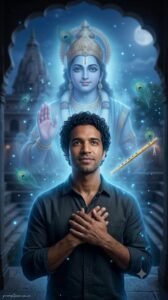
Prompt 1 – Krishna’s Protective Blessing Portrait
Use the uploaded photograph as the only facial identity reference and preserve the exact facial structure, hairstyle, eyebrows, eyes, skin tone, lips, facial proportions, natural expression, and every recognizable feature without changing the person’s identity. Generate an ultra realistic vertical 9:16 devotional portrait where the subject calmly stands beneath a peaceful night sky with hands gently folded near the heart while looking slightly upward with faith and confidence. Behind the subject, create a majestic yet softly transparent appearance of Lord Krishna emerging through glowing blue mist without overpowering the portrait. Place Lord Krishna’s graceful right hand gently above the subject’s shoulder as a symbolic blessing rather than physical contact. Add subtle glowing peacock feathers floating in the air, a softly illuminated golden flute resting beside Krishna, and delicate blue spiritual particles drifting through the scene. Surround the subject with gentle divine blue aura that naturally blends into clothing and skin reflections without looking artificial. Cinematic moonlight mixed with soft heavenly blue illumination, realistic shadows, premium DSLR photography, shallow depth of field, HDR rendering, ultra realistic skin texture, masterpiece quality, ultra detailed 8K resolution. Add a small elegant watermark “promptseen.co.in” in the bottom-left corner. Generate the final image in vertical 9:16 format.
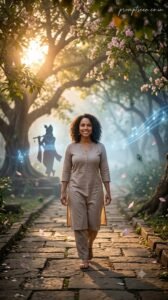
Prompt 2 – Vrindavan Forest Divine Portrait
Reference the uploaded image exclusively for facial identity and accurately preserve the original face, hairstyle, complexion, eyebrows, eyes, lips, facial proportions, and every natural facial detail exactly as shown in the reference photo. Produce a realistic vertical 9:16 portrait where the subject peacefully walks through an ancient Vrindavan-inspired forest filled with flowering trees, sacred pathways, soft morning mist, and golden sunlight filtering through the leaves. A graceful divine silhouette of Lord Krishna is visible in the distance beside an old Kadamba tree while faint flute melodies are represented through elegant glowing blue musical light trails. Small peacock feathers gently float through the air and soft lotus petals drift around the subject. The person wears simple modern clothing while maintaining a humble devotional expression. Warm sunrise lighting blends naturally with soft celestial blue highlights, creating peaceful cinematic depth without excessive glow. Hyper realistic DSLR photography, premium devotional editorial style, realistic skin texture, HDR lighting, shallow depth of field, luxury cinematic color grading, ultra detailed 8K quality. Place the handwritten watermark “promptseen.co.in” near the upper-right corner. Generate vertically in 9:16 format.
Prompt 3 – Modern Krishna Aura City Portrait
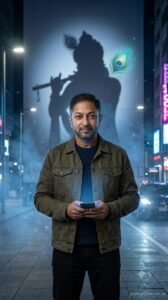
Take the uploaded photo as the only facial identity source and faithfully preserve every recognizable facial detail including hairstyle, eyebrows, eyes, skin tone, lips, beard details (if present), facial proportions, and natural expression without any identity changes. Create a premium vertical 9:16 portrait where the subject stands beside a modern city street at night wearing casual contemporary clothing while holding a smartphone at waist level. Behind the subject, a large glowing shadow inspired by Lord Krishna appears naturally across a nearby wall, with a radiant peacock feather and elegant flute shape subtly integrated into the shadow. The phone screen softly reflects a calm blue spiritual light that illuminates the hands and face without becoming unrealistic. Gentle blue mist moves through the street while tiny glowing particles float around the scene. Cinematic urban lighting combines with soft divine blue highlights to create a peaceful devotional atmosphere. Professional full-frame DSLR photography, realistic skin texture, premium HDR rendering, shallow depth of field, ultra detailed 8K resolution, editorial-quality color grading. Add a small handwritten watermark “promptseen.co.in” in the lower-right corner. Generate the portrait in vertical 9:16 orientation.
One Detail That Improved Every Generation
I regenerated the first prompt five times after removing the words “bright glowing aura” and replacing them with “soft divine blue light”. The difference was immediate. The face remained clearer, and Krishna’s presence felt peaceful instead of overpowering.
I also noticed that keeping Lord Krishna slightly in the background rather than fully in front of the subject helped preserve the person’s identity much more accurately while still creating a strong devotional mood.
 Trending AI Cricket Stadium Video Editing 2026
Prompt 4 – Temple Sunrise Blessing Portrait
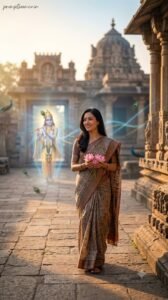
Use the uploaded image strictly as the facial identity reference and preserve the exact facial structure, skin tone, hairstyle, eyebrows, eyes, lips, facial proportions, natural smile, and every recognizable facial detail without any alteration. Generate a premium vertical 9:16 devotional portrait where the subject peacefully walks along the stone pathway of an ancient Krishna temple during sunrise while gently holding fresh lotus flowers with both hands. In the distance, a radiant yet softly transparent vision of Lord Krishna stands near the temple entrance, surrounded by delicate golden light and a graceful blue spiritual aura. Small peacock feathers slowly drift through the morning air while faint glowing flute-inspired energy ribbons flow naturally toward the subject. Warm sunrise light mixes beautifully with soft celestial blue highlights, creating realistic shadows and peaceful cinematic depth. Professional DSLR photography, realistic skin texture, HDR rendering, shallow depth of field, premium devotional color grading, masterpiece quality, ultra detailed 8K resolution. Add a small handwritten watermark “promptseen.co.in” near the upper-left corner. Generate the image in vertical 9:16 format.
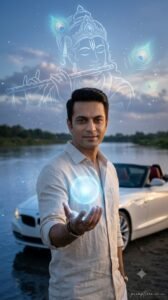
Prompt 5 – Divine Blue Energy Portrait
Reference only the uploaded photograph to preserve the person’s authentic facial identity including hairstyle, complexion, eyebrows, eyes, lips, facial proportions, beard details (if present), and natural expression exactly as captured in the original image. Create an ultra realistic vertical 9:16 portrait where the subject stands calmly beside a quiet riverside at dusk while extending one hand slightly forward. A glowing sphere of gentle blue divine energy rests above the open palm, softly illuminating the fingers and clothing. Behind the subject, a magnificent translucent outline of Lord Krishna appears across the evening sky with subtle flute details and softly glowing peacock feathers woven into the surrounding clouds. Fine spiritual particles float through the atmosphere while calm river reflections mirror the celestial blue light. Blend cool twilight lighting with gentle golden highlights to create a peaceful devotional atmosphere. Hyper realistic DSLR photography, cinematic HDR lighting, realistic skin texture, luxury editorial finishing, shallow depth of field, ultra detailed 8K resolution. Position the elegant watermark “promptseen.co.in” in the lower-right corner. Generate vertically in 9:16 composition.
Making the Blessing Feel Natural
One thing I learned while experimenting is that Lord Krishna doesn’t always need to appear clearly in the frame. Sometimes a gentle shadow, a glowing flute, or a single peacock feather creates a much stronger emotional feeling than a large figure filling the background.
I also try to match the lighting with the spiritual effect. If the background already has warm sunrise light, I keep the blue aura soft instead of making it overpower the entire scene.
 3 Viral Shadow Holding Hand Prompt 2026
Easy Ways to Create New Krishna-Themed Variations
Once the identity section works properly, you can create many different devotional edits by changing only the location or atmosphere. The face stays consistent while every image feels fresh.
- Replace the temple with the peaceful banks of the Yamuna River.
- Create a Janmashtami celebration with glowing diyas.
- Generate a rainy Vrindavan evening filled with soft mist.
- Place the subject beneath a large Kadamba tree with floating petals.
- Create a moonlit devotional portrait with gentle flute light.
- Generate a peaceful village pathway surrounded by cows and greenery.
- Add soft flower showers instead of glowing particles.
- Create a palace courtyard with traditional lamps and blue aura.
Generate Vertically for Better Results
Every prompt in this collection is written for a 9:16 vertical portrait. This composition leaves enough room for the person, the devotional atmosphere, and the symbolic presence of Lord Krishna without making the frame feel crowded.
If you want to post the image on Instagram or Facebook, you can crop it to 4:5 after generation. The important facial details and divine elements will remain centered, so the composition still looks balanced.

Frequently Asked Questions
Which AI image generator gives the best results for Krishna edits?
These prompts work well with ChatGPT Images, Gemini, Flux, Ideogram, and other AI image generators that support reference photos. In my experience, the quality of the uploaded image has a bigger impact than the AI model itself.
Will the AI change my face?
Not if you use a clear reference photo and keep the identity-preservation instructions in the prompt. A well-lit front-facing image usually keeps facial features much more accurate.
Can I replace the background with a temple or Vrindavan?
Yes. You can swap the background with a Krishna temple, Vrindavan streets, the Yamuna riverbank, or a peaceful garden without changing the identity section of the prompt.
Why does Lord Krishna sometimes look too bright?
This usually happens when the prompt asks for strong glowing effects everywhere. Keeping Krishna slightly transparent with soft divine lighting creates a much more peaceful and realistic devotional image.
Can I use these images for WhatsApp Status and Instagram Reels?
Yes. Since every prompt generates a 9:16 vertical portrait, the images work perfectly for WhatsApp Status, Instagram Stories, Reels covers, Facebook Stories, and mobile wallpapers.
What Didn’t Work During My Tests
At one point I combined bright blue lightning, heavy smoke, glowing particles, oversized halos, and multiple aura layers in the same prompt. Instead of looking spiritual, the image started feeling more like fantasy artwork.
After simplifying the scene, the mood changed completely. A soft blue glow, one symbolic flute, and a few floating peacock feathers created a much calmer devotional atmosphere while keeping the person’s face natural.
I also found that placing Lord Krishna slightly behind or above the subject worked better than positioning Him directly in front. The blessing felt more respectful, and the AI preserved facial identity much more consistently.
Beautiful Ways to Use These Portraits
These devotional edits work well for many personal and festive occasions beyond social media.
- Janmashtami greeting posts
- Instagram devotional reels
- WhatsApp profile pictures
- WhatsApp Status videos
- Facebook devotional posts
- Mobile wallpapers
- YouTube community posts
- Personal prayer-themed artwork
- Festival invitation graphics
Expected Output
With a clear reference image, these Lord Krishna AI Photo Editing Prompts should generate realistic devotional portraits that preserve your facial identity while blending peaceful spiritual elements into the scene. The final image should look like a professionally edited photograph rather than a heavily manipulated fantasy illustration.
You can expect balanced blue lighting, natural skin tones, realistic background depth, subtle divine symbolism, and a calm devotional mood that feels respectful and visually pleasing.
Final Thoughts
The most memorable Krishna AI portraits aren’t the ones with the biggest special effects. The images that stayed with me after testing were the ones where the spiritual details felt quiet and meaningful while the person’s original face remained completely recognizable.
Once you create a Lord Krishna AI Photo Editing Prompt that consistently preserves your identity, keep it as your master prompt. From there, you can experiment with temples, forests, riversides, Janmashtami celebrations, sunrise scenes, or peaceful night settings without rewriting everything from the beginning.
I’ll continue experimenting with new devotional AI editing styles throughout 2026. Whenever I discover prompt combinations that produce more natural blessings, cleaner facial preservation, or more realistic Krishna-inspired portraits, I’ll add them here only after generating and comparing real results myself.