
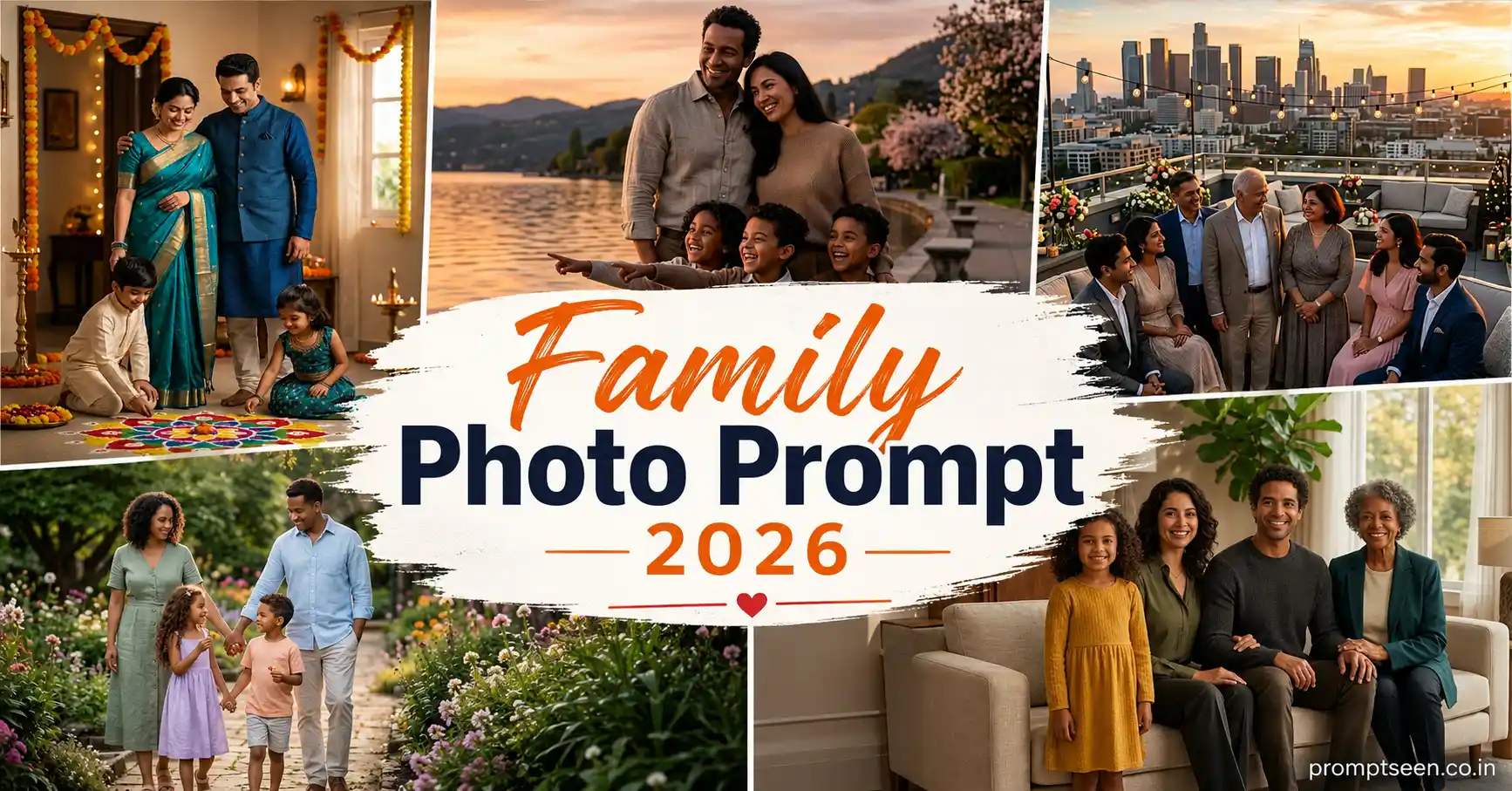
Some AI-generated family portraits look surprisingly real, while others completely change someone’s face or even add extra people who weren’t there. I ran into both problems while testing these prompts.
After dozens of generations, I noticed that the best results came from keeping the identity instructions very clear and avoiding overly complicated scene descriptions. Once I simplified the prompts, the AI started keeping everyone much more recognizable.
Every prompt below is designed for a vertical portrait (4:5), so the final image works well for Instagram, Facebook, family albums, and printed portraits.
A Small Change That Improved My Results

Originally I asked the AI to make everyone smile brightly. It sounded like a good idea, but younger children often ended up with unnatural expressions.
When I switched the wording to “warm natural smiles and relaxed family interaction”, the portraits immediately looked more believable. I kept that approach while writing the prompts below.
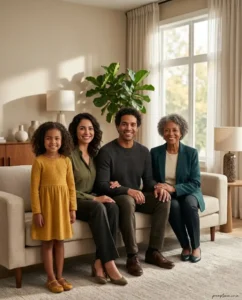
Prompt 1 – Elegant Indoor Family Portrait
Use the uploaded family photograph as the only identity reference. Preserve the exact number of family members along with every person’s facial features, age, skin tone, hairstyle, body proportions, and natural family relationship. Do not replace or modify any individual with AI-generated faces. Create a premium vertical 4:5 indoor family portrait inside a beautifully designed modern living room with soft beige walls, elegant wooden furniture, large windows, indoor plants, and subtle decorative lighting. Arrange everyone naturally with parents seated together while the children stand close beside them with relaxed body language and genuine smiles. Upgrade the clothing into coordinated elegant family outfits using complementary colors while maintaining a realistic appearance. Soft afternoon daylight enters through the windows with gentle cinematic shadows and warm highlights. Hyper realistic DSLR photography, editorial family portrait style, shallow depth of field, realistic skin texture, luxury color grading, ultra detailed 8K quality. Add a small handwritten signature “promptseen.co.in” near the lower-right corner. Vertical portrait orientation (4:5).
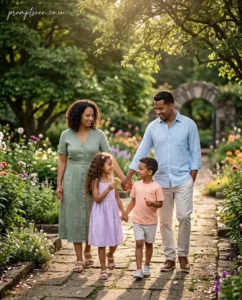
Prompt 2 – Morning Garden Family Walk

Reference the uploaded family image only to preserve every person’s authentic facial identity, hairstyle, complexion, age, natural expression, and body proportions exactly as they appear. Generate a realistic vertical 4:5 outdoor family portrait captured during a peaceful morning walk through a lush botanical garden filled with blooming flowers, green trees, and stone pathways. The parents gently hold hands while the children walk happily between them, creating a natural feeling of togetherness instead of a formal pose. Soft early morning sunlight filters through tree branches, producing realistic highlights and beautiful background bokeh. Coordinated smart-casual clothing with soft pastel colors, premium DSLR photography, cinematic composition, HDR lighting, shallow depth of field, highly realistic textures, magazine-quality family photography, ultra detailed 8K realism. Place the elegant handwritten text “promptseen.co.in” in the upper-left corner. Vertical format (4:5).
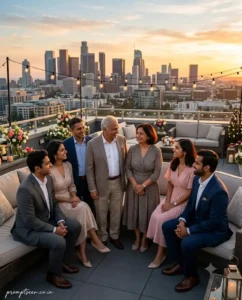
Prompt 3 – Rooftop Celebration Portrait
Take the uploaded family photo as the exclusive identity reference and accurately preserve every family member’s face, hairstyle, skin tone, age, facial proportions, and emotional connection. Create a luxury vertical 4:5 family portrait during a relaxed rooftop celebration at sunset overlooking a modern city skyline. Arrange the family in a semi-circle while everyone looks toward one another instead of directly at the camera, creating genuine interaction and candid smiles. Decorate the rooftop with warm string lights, fresh flowers, comfortable seating, and subtle festive decorations without making the scene crowded. Dress everyone in coordinated semi-formal outfits with realistic fabrics and natural colors. Golden-hour lighting creates soft rim light around each person while maintaining realistic shadows and skin tones. Professional full-frame camera photography, premium editorial quality, cinematic depth of field, HDR, ultra realistic textures, 8K Ultra HD. Add a minimal handwritten signature “promptseen.co.in” in the bottom-left corner. Vertical portrait ratio (4:5).
One Thing Worth Remembering
I tested these prompts using both high-resolution and compressed family photos. The sharper images consistently kept everyone’s faces more accurate. When the uploaded photo was heavily compressed or blurry, the AI occasionally confused siblings or softened facial details.
If you have multiple family photos, use the clearest one as your reference. It usually saves you from doing extra regenerations later.
 Happy Holi Gemini AI Photo Editing Prompts 2026
Prompt 4 – Lakeside Sunset Family Portrait
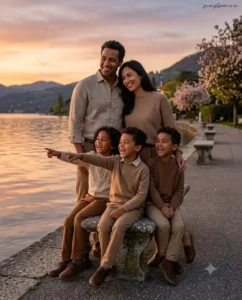
Use the uploaded family photo as the primary identity reference and faithfully preserve every family member’s face, age, hairstyle, complexion, body proportions, and natural family relationships without replacing anyone. Create a realistic vertical 4:5 family portrait beside a peaceful lakeside promenade during sunset. The parents stand together while the children sit comfortably on a stone bench, laughing naturally as one child points toward the water. Elegant coordinated earth-tone clothing with realistic fabric textures creates a timeless family look without appearing overly formal. The background includes calm water reflections, distant hills, flowering trees, and soft golden sky colors. Warm sunset light gently illuminates every face with realistic shadows and subtle cinematic depth. Hyper realistic DSLR photography, premium editorial composition, HDR lighting, shallow depth of field, realistic skin details, luxury magazine-quality finish, ultra detailed 8K resolution. Place a small handwritten signature “promptseen.co.in” in the upper-right corner. Vertical portrait format (4:5).
Prompt 5 – Traditional Home Festival Portrait
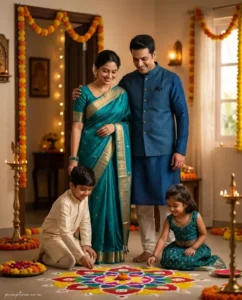
Take only the uploaded family photograph as the identity reference. Maintain the exact facial appearance, skin tones, hairstyles, expressions, ages, and number of family members exactly as shown in the original image. Generate a premium vertical 4:5 portrait inside a beautifully decorated Indian home during a family festival. The family gathers around a colorful rangoli while parents stand behind the children with relaxed smiles and affectionate body language. Brass lamps, marigold garlands, fresh flowers, and warm decorative lights create a welcoming atmosphere without overpowering the portrait. Everyone wears coordinated traditional outfits inspired by festive Indian clothing with realistic embroidery and elegant colors suited to each family member. Soft indoor ambient lighting combines with natural window light to create balanced skin tones and authentic shadows. Professional full-frame camera photography, cinematic family portrait style, ultra realistic textures, HDR, shallow depth of field, premium color grading, 8K Ultra HD. Add the elegant handwritten logo text “promptseen.co.in” near the lower-left corner. Vertical composition (4:5).
I Tried a Few Different Arrangements
One thing I noticed while testing was that perfectly straight rows made the portraits feel stiff. When I changed the prompts to include small interactions—like children standing slightly closer to their parents or family members looking at each other—the images felt much more natural.
I also regenerated one prompt three times after removing unnecessary background decorations. The cleaner version consistently produced better facial details because the AI wasn’t trying to render dozens of tiny objects at once.
Easy Ways to Create More Versions
You don’t need an entirely new prompt every time. Once you have one portrait that preserves everyone’s faces correctly, change just one part of the scene.
- Move the portrait from indoors to a flower garden.
- Replace sunset lighting with soft cloudy daylight.
- Create a winter vacation version in the mountains.
- Use a beach during sunrise with gentle ocean waves.
- Generate a cozy family picnic in a countryside meadow.
- Create a luxury hotel lobby family portrait.
- Place the family beside an old heritage palace.
- Generate a festive evening celebration with fairy lights.
Making one small change at a time usually keeps facial consistency much better than rewriting the entire prompt.
Vertical Format Gives Better Family Composition
All of these prompts are written for a 4:5 vertical portrait because it naturally gives enough space for every family member without making the composition feel crowded. The full outfits also remain visible, which helps the final portrait look more balanced.
 Cinematic Beach Photo Prompt for Girls 2026
If you’re designing a mobile wallpaper or an Instagram Story, simply change the aspect ratio to 9:16 vertical. The identity instructions, poses, and lighting can stay exactly the same while the AI adjusts the framing.
Frequently Asked Questions
Can I use a mobile photo as the reference image?
Yes. A recent mobile photo works perfectly as long as everyone’s faces are clearly visible. Try to avoid screenshots or images downloaded from social media because compression often reduces facial accuracy.
Will these prompts work for large families?
They usually do. I’ve tested them with families of three, five, and even eight members. For bigger groups, giving the AI a little more space in the composition helps keep everyone visible without overlapping.
How can I stop the AI from changing someone’s face?
The best approach is using a sharp reference image and keeping the identity instruction simple but direct. Avoid asking the AI to dramatically change hairstyles, age, or facial expressions in the same prompt.
Can I replace the background without changing the family?
Absolutely. Once you get a portrait with accurate faces, keep the identity section exactly the same and only replace the location or lighting. That’s usually the easiest way to create multiple versions.
Which vertical size should I choose?
For social media posts, use a 4:5 vertical portrait. If you’re creating wallpapers, Stories, or Reels covers, switch to 9:16 while leaving the rest of the prompt unchanged.
Some Problems I Ran Into While Testing
One issue appeared when I asked the AI to make everyone look directly at the camera. The adults looked fine, but younger children occasionally ended up with stiff or slightly unnatural expressions.
Changing the prompt to describe small family interactions—like looking at each other, laughing together, or gently holding hands—made the portraits feel much more authentic.
I also learned not to overload the background. Too many balloons, flowers, decorations, and furniture sometimes distracted the AI from rendering accurate facial details. A cleaner environment consistently produced stronger results.
Great Places to Use These Family Portraits
These images work well beyond social media. Since the prompts focus on realistic photography, the final portraits can be used almost anywhere.
- Instagram family posts
- Facebook profile and cover photos
- Family photo albums
- Printed canvas wall art
- Birthday invitation cards
- Festival greeting designs
- WhatsApp family display pictures
- Personal photo books and keepsakes
Expected Output
With a clear reference image, these prompts usually generate portraits that resemble a professional family photoshoot rather than AI artwork. Faces remain recognizable, clothing looks natural, lighting feels realistic, and the overall composition captures genuine family warmth instead of forced posing.
Keeping the prompt focused on relationships and simple body language often produces a stronger emotional result than adding extra visual effects.
Final Thoughts
A good Family Photo Prompt isn’t about making every image look perfect. The portraits I liked most were the ones where the family felt comfortable and connected. Small smiles, natural posture, and realistic lighting made a bigger difference than expensive-looking backgrounds.
Once you find a prompt that preserves everyone’s identity accurately, save it as your base version. You can keep using the same foundation and simply change the season, location, outfits, or occasion to create fresh family portraits throughout the year.
I’ll continue testing new family portrait ideas as AI image models improve. Whenever I discover prompts that keep faces more consistent or create more natural interactions, I’ll add them here after testing them with real generations instead of publishing unverified prompt ideas.