
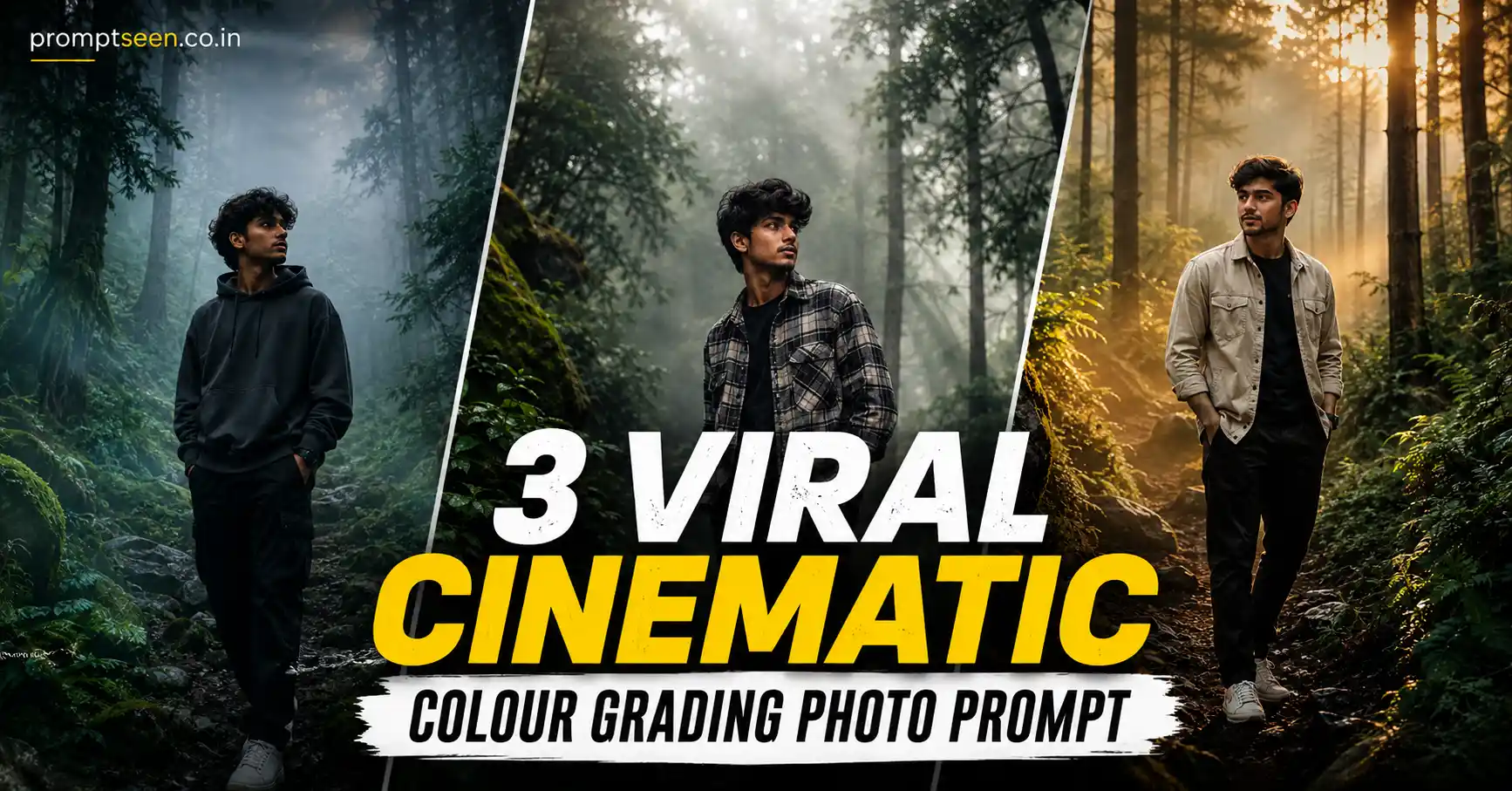
Color grading has become one of the biggest reasons why AI-generated photos look realistic in 2026. A simple portrait or landscape can completely change its mood with the right color tones, lighting, and atmosphere. Instead of using bright artificial filters, creators now prefer cinematic color grading that feels natural, premium, and professionally edited.
The Cinematic Colour Grading Photo Prompt trend has become extremely popular across Instagram, Pinterest, Facebook, and photography communities because it transforms ordinary photos into movie-like masterpieces. Deep forest greens, soft fog, golden light rays, rich shadows, and balanced highlights create images that resemble professional Lightroom edits rather than AI-generated artwork.
Modern AI image generators can now recreate realistic cinematic grading while preserving facial identity, natural textures, and environmental details. Whether you’re editing portraits, travel photos, nature landscapes, or profile pictures, the right color grading prompt can dramatically improve the final result without making the image look fake.
If you’re looking for the best Cinematic Colour Grading Photo Prompt, this article includes three detailed prompts that work beautifully with Gemini AI, ChatGPT Image Generator, Midjourney, Leonardo AI, Flux AI, and Adobe Firefly.
Why Cinematic Colour Grading Is Trending in 2026
Professional photographers spend hours color grading their images because color creates emotion. Cool forest greens can make a photo feel peaceful, while warm golden highlights create feelings of comfort and nostalgia. AI image generators now understand these visual moods surprisingly well.
One of the biggest improvements in 2026 is realistic color science. Earlier AI edits often looked oversaturated or unnatural. Today’s models create balanced shadows, realistic skin tones, natural contrast, smooth tonal transitions, and authentic lighting that closely resemble DSLR photography edited inside Lightroom.
Cinematic color grading is also becoming popular because it works across many photography styles. Travel portraits, foggy forests, mountain landscapes, wedding photos, fashion editorials, and lifestyle images all benefit from premium color grading without changing the original identity of the subject.
Creators especially love this style because it adds depth instead of simply increasing saturation. Atmospheric haze, subtle HDR, volumetric light rays, realistic weather, and natural shadows combine to produce photographs that feel immersive and professionally captured.
This editing style continues to grow because it combines:
- Professional Lightroom-style editing
- Natural cinematic lighting
- Premium DSLR realism
- Balanced HDR color grading
- Photorealistic textures
- Atmospheric storytelling
- Instagram and Pinterest-ready visuals
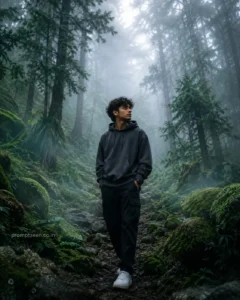
Prompt 1: Cinematic Foggy Forest Colour Grading
This prompt transforms an ordinary image into a premium DSLR-quality forest masterpiece with realistic cinematic grading, soft mist, and beautiful atmospheric lighting.
Use the uploaded image as the base photo while preserving 100% facial identity, natural skin texture, clothing details, body proportions, lighting balance, and realistic appearance without changing any recognizable feature. Transform the entire scene into an ultra-realistic cinematic foggy forest masterpiece filled with dense natural white fog, layered atmospheric mist, and a peaceful woodland environment. Apply premium forest-inspired color grading using deep emerald green, moss green, dark teal, earthy brown, muted highlights, and rich natural contrast. Enhance trees, foliage, rocks, and the surrounding landscape into a lush enchanted rainforest while maintaining complete realism. Add soft volumetric light rays filtering naturally through the fog to create beautiful cinematic depth and atmospheric perspective. Upgrade image quality to ultra-HD DSLR realism with razor-sharp details, HDR lighting, realistic textures, balanced exposure, refined shadows, natural highlights, smooth tonal transitions, subtle humidity, dreamy haze, immersive depth, and professional Lightroom-style grading. The final result should resemble a National Geographic-quality forest photograph captured on a cold misty morning using a Canon EOS R5, photorealistic rendering, masterpiece quality, ultra-detailed 8K resolution, vertical 4:5 composition. Add minimal logo text “promptseen.co.in”.
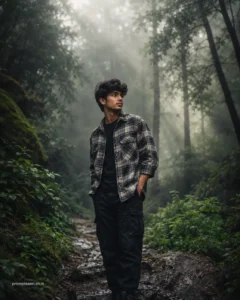
Prompt 2: National Geographic Cinematic Landscape Colour Grading
If you want a clean, ultra-realistic landscape with professional DSLR color grading and realistic weather effects, this prompt creates a premium nature photograph that looks straight out of National Geographic.
Use the uploaded image as the exact identity reference and preserve 100% facial structure, hairstyle, skin tone, facial features, clothing details, body proportions, expression, and natural appearance without changing any recognizable detail. Create an ultra-realistic cinematic outdoor portrait surrounded by dense natural fog, layered mist, and breathtaking woodland scenery. Apply realistic moody nature color grading featuring deep emerald green foliage, wet forest textures, soft grey fog, earthy brown tones, realistic atmospheric depth, and balanced HDR lighting. Add subtle volumetric god rays passing naturally through the trees, soft diffused daylight, realistic weather conditions, damp forest plants, wet leaves, premium DSLR shadows, and authentic reflections. Enhance the entire image with Lightroom-style cinematic color grading, natural skin tones, sharp textures, realistic depth of field, premium contrast, National Geographic-inspired photography, Canon EOS R5, 85mm lens, ultra-detailed photorealistic rendering, masterpiece quality, 8K ultra-HD resolution, vertical 4:5 composition. Add minimal logo text “promptseen.co.in”.
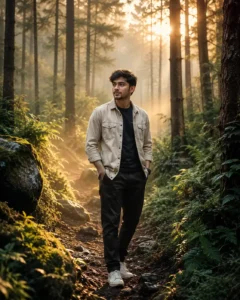
Prompt 3: Golden Hour Cinematic Forest Portrait
This prompt combines warm golden-hour lighting with premium forest color grading to create a cinematic travel portrait filled with natural atmosphere and DSLR-quality realism.

Use the uploaded image as the exact identity reference and preserve 100% facial structure, hairstyle, skin tone, facial features, body proportions, expression, clothing details, and natural appearance without altering any recognizable feature. Transform the scene into an ultra-realistic cinematic forest portrait captured during early golden hour. The subject stands naturally on a narrow woodland path surrounded by towering pine trees, moss-covered rocks, lush ferns, and soft forest vegetation. Warm golden sunlight filters beautifully through the trees while thin layers of natural morning fog create realistic atmospheric depth. Apply premium cinematic Lightroom color grading with rich emerald green foliage, warm amber highlights, earthy brown textures, balanced HDR contrast, soft shadows, realistic skin tones, subtle haze, and volumetric light rays. Add realistic humidity, shallow depth of field, DSLR-quality sharpness, premium travel photography aesthetics, Canon EOS R5, RF 85mm f/1.2 lens, photorealistic rendering, masterpiece quality, National Geographic-inspired composition, ultra-detailed 8K resolution, vertical 4:5 composition. Add minimal logo text “promptseen.co.in”.
How to Get Better Results with Cinematic Colour Grading AI Prompts
The quality of your final image depends heavily on the reference photo you upload. Always choose a high-resolution image where your face is clearly visible, the lighting is balanced, and the subject is in sharp focus. Modern AI image generators can preserve facial identity much more accurately when the original image contains natural details and good lighting.
Professional color grading is more than simply increasing saturation or contrast. The goal is to create a balanced image where shadows, highlights, midtones, and colors work together naturally. Rich greens, earthy browns, cool teal shadows, and warm golden highlights create a cinematic atmosphere without making the photo look artificial.
Fog and atmospheric effects should also remain realistic. Instead of covering the entire image with heavy mist, use layered fog that gradually fades into the distance. This creates natural depth while allowing the subject to remain the main focus of the composition.
Adding professional camera details inside your prompt can further improve realism. Mentioning cameras like the Canon EOS R5, Sony A7R V, or Nikon Z9 together with portrait lenses such as an 85mm or 50mm lens helps AI recreate realistic depth of field, lens compression, smooth bokeh, and DSLR-quality sharpness.
If you’re editing portraits, always preserve natural skin tones. Avoid excessive orange or teal color grading that can make faces look unrealistic. Lightroom-inspired grading with soft highlights and controlled contrast usually produces the most professional results.
Finally, keep the composition clean. Natural forests, mountain landscapes, misty roads, lakes, and subtle weather effects work much better than overcrowded scenes. A simple composition with excellent lighting almost always looks more premium than one filled with unnecessary elements.

Best AI Tools for Cinematic Colour Grading
- Gemini AI
- ChatGPT Image Generator
- Midjourney
- Leonardo AI
- Flux AI
- Adobe Firefly
Frequently Asked Questions
Which AI tool creates the best cinematic colour grading?
Gemini AI, ChatGPT Image Generator, Midjourney, Leonardo AI, Flux AI, and Adobe Firefly all produce realistic cinematic color grading with excellent lighting, natural textures, and professional DSLR-style results.
Can AI preserve my face while applying cinematic colour grading?
Yes. Modern AI models can accurately preserve facial structure, hairstyle, skin tone, and natural expressions while enhancing the lighting, colors, atmosphere, and background.
Why is cinematic colour grading trending in 2026?
People prefer images that look like professional photographs instead of heavily filtered edits. Cinematic grading creates balanced colors, realistic shadows, premium contrast, and natural lighting that work across portraits, travel photography, and landscapes.
How can I make my AI-generated photos look more realistic?
Start with a sharp reference image, preserve identity, use natural lighting, include professional camera settings, apply Lightroom-style color grading, and avoid oversaturated colors. Small adjustments usually create more realistic results than dramatic effects.
Final Thoughts
The Cinematic Colour Grading Photo Prompt trend has become one of the most popular AI photography styles of 2026 because it transforms ordinary images into premium DSLR-quality photographs without losing realism. Whether you prefer misty forests, dramatic landscapes, or warm golden-hour portraits, these prompts help create beautifully balanced images with professional Lightroom-style grading, natural atmospheric depth, and cinematic storytelling. With a detailed prompt and a high-quality reference image, today’s AI image generators can produce stunning visuals that look ready for magazines, travel portfolios, wallpapers, or social media.