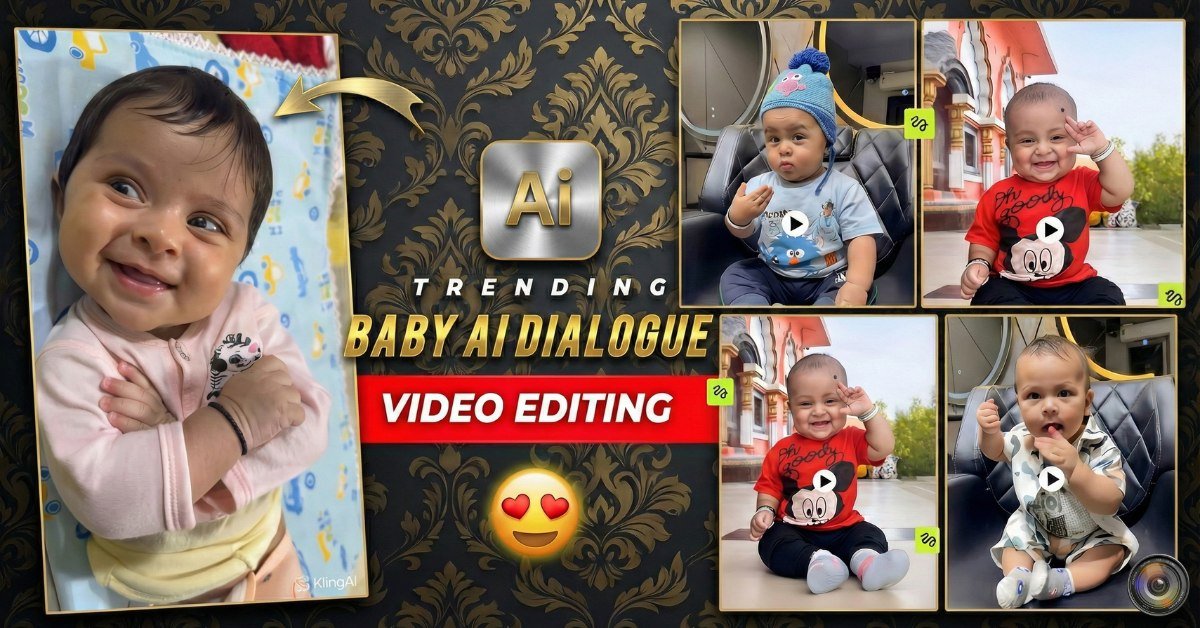
In 2026, one of the most loved and shared video styles on Instagram Reels, YouTube Shorts and TikTok is Baby AI Dialogue Videos.
These are short, super-cute videos where babies appear to speak full sentences with funny, savage, motivational or dramatic AI-generated voices — and their lips often sync surprisingly well!
Parents, pet pages, meme creators, and even brands are using this trend to get millions of views because it is adorable + hilarious + very easy to make with today’s AI tools.
In this 2026 guide you will learn:

- Why baby AI dialogue videos are exploding right now
- Best tools & trending templates
- Step-by-step editing method
- Ready-to-use AI prompts for best results
- How to avoid common mistakes
- Tips to make your baby reels go viral
Let’s create your first viral baby talking video today!
Why Baby AI Dialogue Videos Are Trending in 2026
People love two things: cute babies + savage/funny commentary.
When you combine both with perfect lip-sync AI voices, the video becomes instantly shareable.
Popular dialogue styles in 2026:

- Savage / roasting comebacks
- Motivational gym-style baby talks
- Adult problems explained by babies
- Relationship advice from toddlers
- Reacting to viral trends
- Funny movie dialogues revoiced by babies
Tool Compatibility – Best Tools for Baby AI Dialogue 2026
- CapCut – easiest & free (best templates + auto lip sync effects)
- Runway Gen-3 / Gen-4 – best realistic lip-sync & image-to-video
- Pika 2.1 / 2.2 – fast lip-sync & funny motion
- Viggle AI – excellent character control & talking animation
- HeyGen / D-ID – very natural talking head (paid but high quality)
- ElevenLabs + CapCut – best voice cloning / funny AI voices
Main Trending Baby AI Dialogue Styles 2026
1. Savage Baby Roasting Parents
Baby looking serious while saying savage adult lines
2. Motivational Monday Baby
Baby giving gym / success motivation speech
3. Baby Explaining Adult Problems
“Why relationships fail in 2026” – said by a 1-year-old
4. Movie Dialogue Baby Version
Famous movie scenes revoiced with baby voice
5. Couple Fight – Baby Edition
Baby and another baby (or pet) having funny argument
How to Make Trending Baby AI Dialogue Videos – Step by Step
- Choose or record a cute, clear baby video (face visible, good lighting, some natural mouth movement)
- Open CapCut (mobile or PC)
- Search templates: “baby talking 2026”, “AI baby dialogue”, “talking baby meme”, “lip sync baby”
- Import your baby clip
- Add funny text / dialogue you want the baby to “say”
- Use ElevenLabs or CapCut AI voice to generate the audio (choose funny kid voice or deep savage voice)
- Apply lip-sync effect (CapCut → Effects → Lip Sync / Auto Mouth Sync)
- Add zoom-in, glow text, shake effect or particles on key lines
- Sync the strongest words with baby’s mouth opening moments
- Export 1080p vertical (9:16)
- Post with trending hashtags & funny caption
Best Settings & Tips for Viral Results
- Video length: 7–15 seconds
- Export: 1080p, 30 or 60 fps
- Use bright, happy lighting on baby clip
- Choose voices: high-pitched baby, deep villain, desi accent, American savage, etc.
- Hashtags: #BabyTalking #AIBaby #FunnyBaby #ViralReels2026 #LipSync #BabyMeme
- Hook in first 1–2 seconds (strong zoom + first savage line)
Prompt Variations for AI Voice + Video Tools
- “A cute Indian baby with big eyes speaking in a deep savage adult male voice, roasting his dad, funny and confident tone, 2026 viral meme style”
- “Adorable 1-year-old baby girl giving powerful gym motivation speech like Andrew Tate, intense look, motivational words, high energy voice”
- “Baby explaining why relationships fail in modern times, sarcastic and savage tone, adult problems, funny dialogue, lip sync ready”
- “Hollywood movie style – baby saying famous Thanos dialogue ‘I am inevitable’, dramatic voice, cinematic lighting”
- “Two babies arguing like a married couple, funny desi accent, dramatic expressions, perfect for viral couple reel”
Example Use Cases
- Instagram Reels – daily funny baby content
- YouTube Shorts – baby meme compilation series
- TikTok – savage baby roasting trends
- Parent pages – cute + funny family videos
- Brand marketing – baby “reviewing” products in funny voice
Common Mistakes to Avoid
- Using blurry or side-face baby clips (lip sync fails)
- Dialogue too long (video becomes boring)
- Bad voice choice (too robotic or mismatched tone)
- Not syncing important words with mouth movement
- Adding too many effects (looks over-edited)
- Posting without a funny caption or trending sound
Expected Output Description
The final video shows an adorable baby “talking” with perfect or near-perfect lip sync, funny or savage lines, glowing text animations, zoom effects, and strong music beat sync. These videos usually get very high share rate and comments like “This is too good 😂” or “Send this to your mom!”
Pro Tips for Better Results
- Use short & punchy dialogues (max 1–2 lines)
- Test 3–4 different voices for the same clip
- Post during evening hours (7–10 PM audience time)
- Reply to comments with “template in bio” or “link in comments”
- Make series (Baby Roasts Day 1, Day 2…)
- Duet or stitch viral baby videos for extra reach
SEO-Friendly FAQs
What is Baby AI Dialogue Video Editing?
It is a viral 2026 trend where cute baby videos are edited with AI-generated voices and lip-sync effects so it looks like the baby is speaking funny, savage or motivational sentences.
Which app is best for baby AI talking videos in 2026?
CapCut (free) + ElevenLabs (voice) is the easiest and most popular combo right now. Runway and Pika are great for more realistic lip-sync.
Are Baby AI Dialogue videos free to make?
Yes — CapCut templates and basic AI voices are free. Premium voices or advanced lip-sync tools may need small payment.
Why are baby talking videos going viral?
Because they are super cute + extremely funny. The contrast between innocent face and savage dialogue makes people laugh and share instantly.
Which hashtags should I use for baby AI reels?
#BabyTalking #AIBaby #FunnyBabyReels #ViralBaby #LipSyncChallenge #BabyMeme #Reels2026 #FunnyReels