
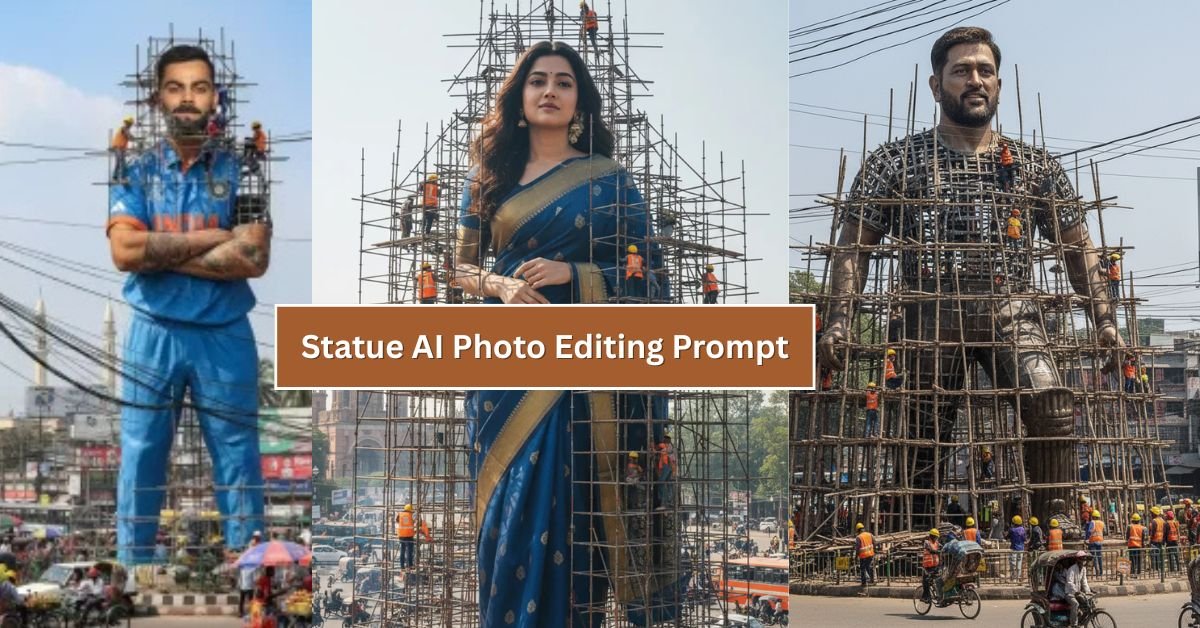
What is Google Gemini Statue AI Photo Editing?
Google Gemini is an advanced AI model that understands both text and images. The Statue AI Photo Editing feature allows users to transform a portrait into a lifelike statue or sculpture with different styles, materials, and artistic themes. This includes marble, bronze, gold, stone, or even futuristic digital textures. The goal is to create stunning visuals that resemble museum-quality statues or fantasy art pieces — all generated with simple prompts.
Why Use Statue AI Photo Editing in 2025?
- High Creativity: Customize portraits into marble, bronze, or gold statues with intricate details.
- Social Media Ready: Create eye-catching edits that stand out on Instagram, TikTok, and Pinterest.
- Professional Branding: Artists and influencers can use unique statue edits as brand visuals.
- AI-Driven Precision: Google Gemini ensures realistic textures, shading, and depth.
- Time-Saving: No need for complex Photoshop skills; a prompt is enough.
Best Google Gemini Statue AI Prompts (2025)
Below are some ready-to-use prompts for Google Gemini that you can copy and paste. Each prompt includes variations in clothing, colors, and statue materials for unique effects:

Create a giant hyper-realistic statue based on the given photo, keeping the original face exactly the same without changes. The statue stands tall in the middle of a roundabout in Dhaka, near a famous historical landmark. The statue is still under construction, surrounded by scaffolding, with many construction workers in yellow helmets and orange vests climbing, welding, and working on it. Parts of the statue's body are still exposed metal framework, while other sections are already detailed and finished.
The background shows the realistic atmosphere of indian city: crowded streets with colorful rickshaws, packed buses, and small cars circling the roundabout. Street vendors with tea stalls, fruit carts, and colorful umbrellas line the roadside. Shop signs, big billboards, and messy hanging electric wires crisscross above the streets, creating the typical Dhaka city vibe. The bright daytime sky shines above, with tropical trees and a bustling, lively atmosphere. Style: photorealistic, vibrant, and full of life.
Clothing & Color Variations for Prompts
You can modify the prompts above by adding different clothing and color combinations. Here are a few examples you can try:
- Clothing Styles: Casual jeans and t-shirt, royal gowns, warrior armor, futuristic bodysuits, traditional attire.
- Color Variations: White marble, black granite, golden metallic, bronze, silver chrome, neon blue, rose gold.
- Background Themes: Museum gallery, ancient temple, futuristic city, royal palace, natural landscapes.
Tips for Crafting Better Statue AI Prompts
While Google Gemini is powerful, the quality of your results depends heavily on your prompt. Here are some expert tips:
- Be Specific: Mention statue material (marble, bronze, gold, stone, chrome) and clothing details.
- Add Lighting: Words like “soft lighting,” “dramatic shadows,” or “heavenly glow” enhance realism.
- Include Backgrounds: Setting a scene (museum, palace, nature, futuristic city) makes the image more immersive.
- Experiment with Colors: Metallic shades and natural textures make your statue edits unique.
- Use Artistic Styles: You can request abstract, classical, fantasy, or futuristic designs.
How to Use These Prompts with Google Gemini AI
To use these prompts:
- Open Google Gemini’s AI photo editing tool (via Google Workspace or Gemini-integrated apps).
- Upload your base portrait or leave it blank for full AI generation.
- Paste one of the prompts above into the text field.
- Customize the prompt with different clothes, colors, or settings.
- Click generate and wait for your statue transformation.
- Save, edit, or re-run with modifications until you’re satisfied.
SEO Benefits of Gemini Statue AI Content
If you’re running a blog, website, or online portfolio, integrating Google Gemini Statue AI prompts can boost your SEO strategy in 2025:
- Unique Visuals: AI-generated statue art makes your content visually appealing.
- Engaging Keywords: Use terms like “Gemini AI photo editing,” “statue prompts,” and “AI art 2025.”
- Long-Form Content: Guides with prompts attract organic traffic from artists, photographers, and creators.
- Social Sharing: Stunning visuals encourage users to share your content, increasing backlinks.
Final Thoughts
The Google Gemini Statue AI Photo Editing Prompts 2025 are a game-changer for creators. With just a few words, you can transform ordinary photos into extraordinary digital statues that look like museum art, fantasy sculptures, or futuristic monuments. Whether you’re looking to boost your social media presence, enhance your brand visuals, or simply explore your creativity, these prompts give you everything you need.
Now it’s your turn — copy these prompts, experiment with colors and clothing styles, and let Google Gemini transform your imagination into stunning AI statues!